Inside the project
Prepared with the project’s development agent from source and retained evidence. This is a project-owner assessment, not an independent customer review. Dated checks were not rerun for this website.
AA Instruments Canvas is the app-level Instruments workspace inside AssistantApp. Library, Board and Focus views make live instruments available beyond an individual note. An instrument is a small interactive tool with a question, controls, evidence and findings: the AI proposes it, the host validates what it can read and do, and the user decides what to keep. The Inference Route Explorer is the first concrete example, comparing AI routes and showing a bounded timing probe with explicit evidence labels. This is separate from Audio Scene Canvas, which handles audio modules and scene routing. The workspace has source, build and headless-check evidence; a native workspace screenshot is now available; an end-to-end live demonstration remains unverified.
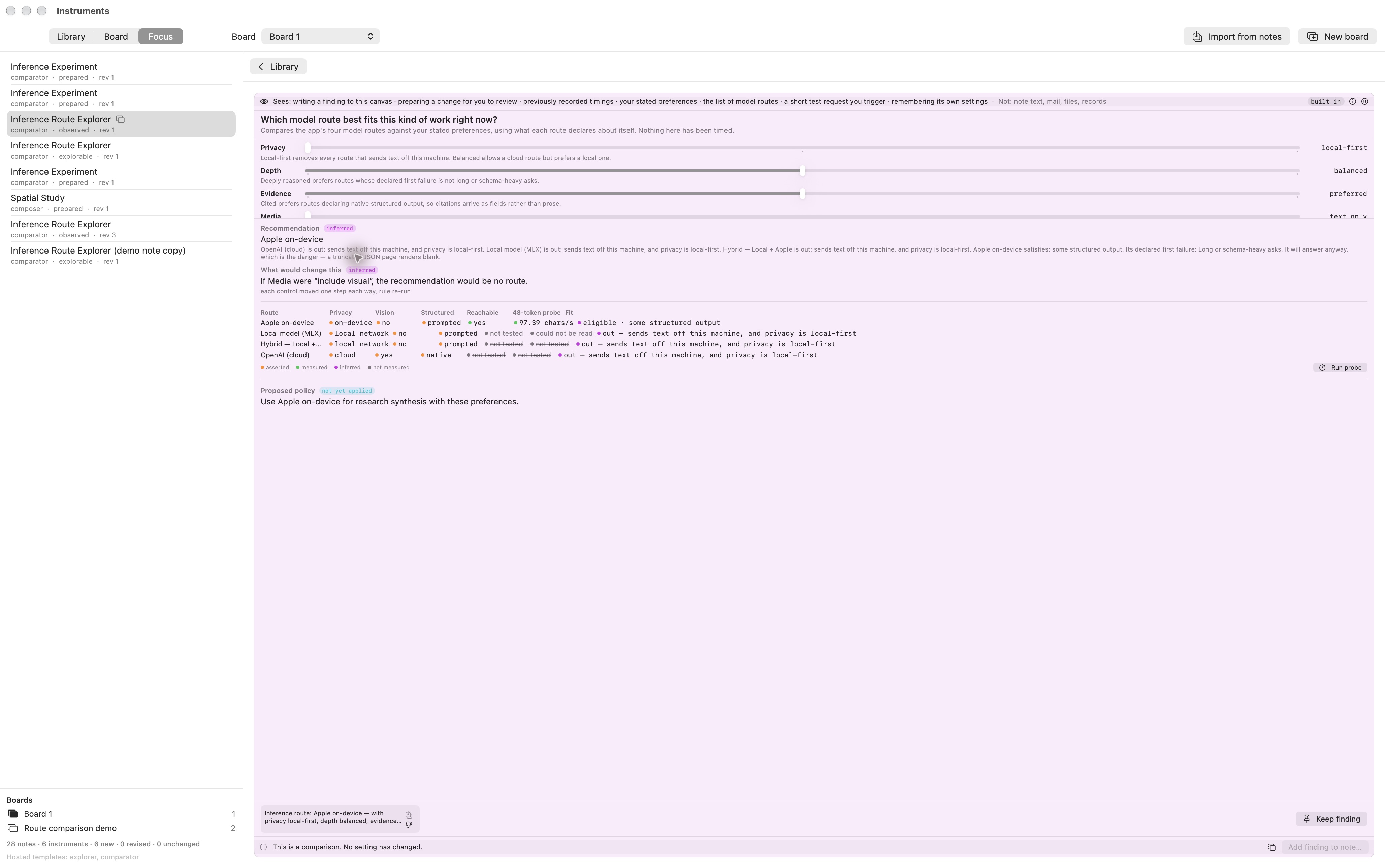
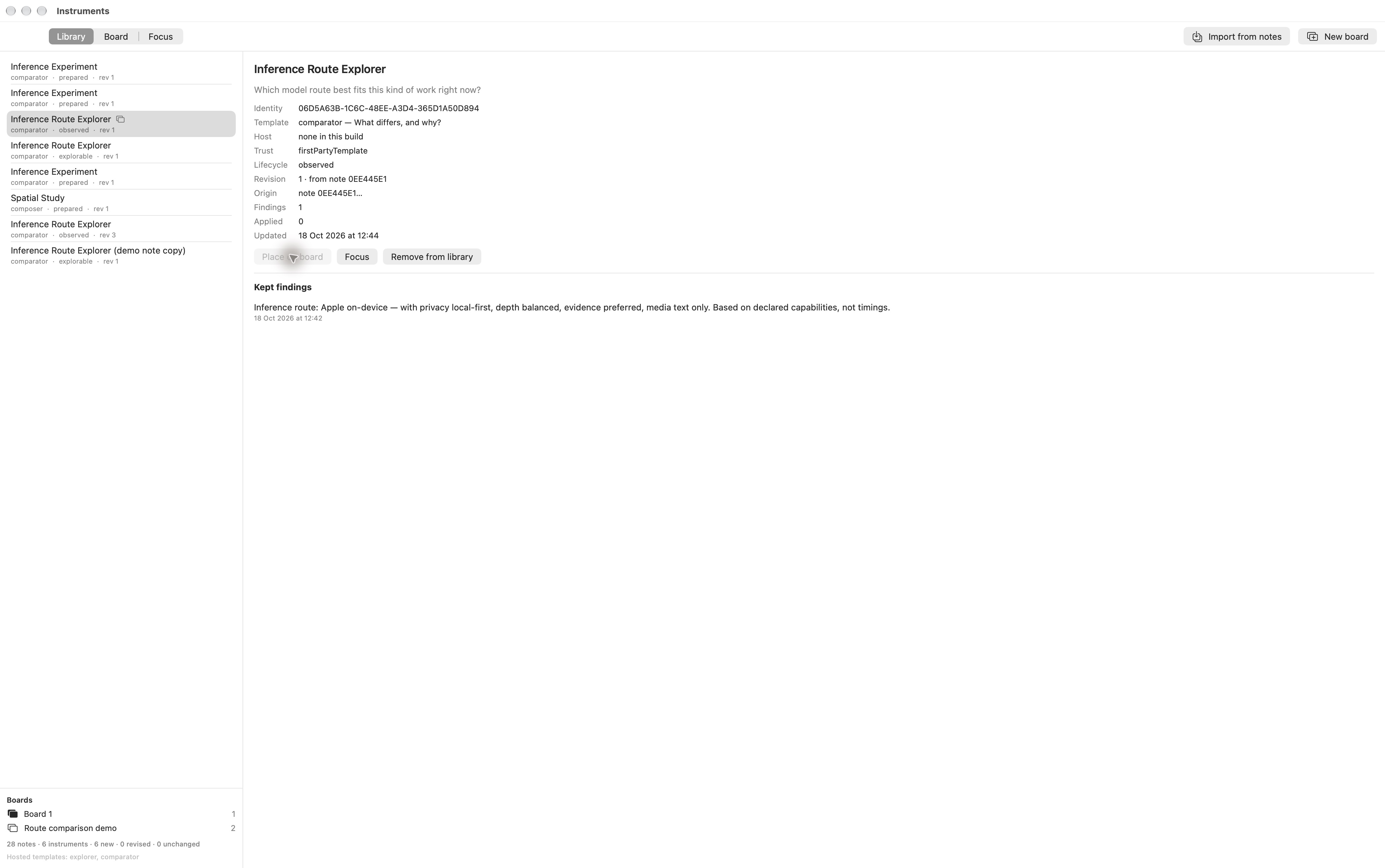
On 18 October 2026 the native Library and Focus views were captured with an Inference Route Explorer from the synthetic demo note. Focus renders the comparison and its declared-capability evidence labels, and the Library shows the kept finding. The Library metadata says “Host none in this build” even though the Focus interface renders; this discrepancy remains visible rather than being treated as resolved. The displayed probe rate is retained earlier data, not a new measurement. No model probe or policy application was run during capture.
A 12-second silent native screen recording now shows Media moving from text-only to include-visual and back. The comparison changes on screen; no probe or global policy application is performed.
What stands out
- Live Instruments enforce a stated contract (AI proposes, host validates, user commits) in code: evidence tiers minted by producers, authority fields with no safe default, a gate that caps evidence-free proposals at preview, sealed web content with a passing egress load test.
Current limits
- macOS research workspace; no public release; a native interface capture does not establish end-to-end runtime acceptance.
- The underlying Live Instruments work includes uncommitted source; component checks do not establish complete live acceptance.
Features & evidence
Live Instruments contract
component-testedInstrumentSpec two-regime decoder, validator, runtime grant computed by the host, bridge gate with receipts and call budget, proposal/approval flow through TBActionGate, seven-state lifecycle, findings with staleness and disagreement, saved templates, bounded speed probe, sealed WKWebView egress (content rule list, CSP, size cap).
Recorded evidence
Notes/Instruments/*.swift (Foundation-only), Document/Canvas/{InstrumentFrame,InstrumentApprovalHost,InstrumentEgress,InstrumentProbeRunner}.swift; InstrumentSelfTest.run() ALL GREEN headless, September 2026 (this session); egress load test executed and passed, September 2026; TBActionGate no-evidence inversion fixed with red-team case 5b (TBRedTeamHarness.swift). Files were untracked in git as of 9 Sep 2026 (memory instruments-workspace-roadmap). Never launched in-app by an agent session.
Instruments workspace
sourceApp-level Instruments panel (library / board / focus) over an instrument library store, with migration from note canvases and a template-keyed host.
Recorded evidence
Notes/Instruments/{InstrumentIdentity,InstrumentLibraryStore,InstrumentNoteMigration,InstrumentsWorkspaceSession,InstrumentHost,InstrumentBoardView}.swift; PanelRegistry.swift:99 'panel.instruments'; commits 6be050c9c (Phase 1) and 1b3e16933 (Phases 2-3) on 9 Sep 2026 on branch claude/dicom-neuromodules-qa-2026-08-24, green shared build, zero warnings (memory). Headless proof 14/14 for Phase 1.
Review updates & corrections
- On 18 October 2026 the native Library and Focus views were captured with an Inference Route Explorer from the synthetic demo note. Focus renders the comparison and its declared-capability evidence labels, and the Library shows the kept finding. The Library metadata says “Host none in this build” even though the Focus interface renders; this discrepancy remains visible rather than being treated as resolved. The displayed probe rate is retained earlier data, not a new measurement. No model probe or policy application was run during capture.
- A 12-second silent native screen recording now shows Media moving from text-only to include-visual and back. The comparison changes on screen; no probe or global policy application is performed.
Workflow walkthrough
A guide to the native workflow. These steps describe the app; only the recordings and images embedded on this page are available as website demonstrations.
- Open the Instruments panel and browse the library.
- Choose an instrument and arrange it on the Board.
- Focus the Inference Route Explorer and inspect its controls and evidence labels.
- Run a bounded probe only when authorized in the native app, then inspect the single-sample result.
- Keep a finding or append it to a note through the explicit approval flow.
Planned captures · not yet available
- Canvas mode on a synthetic note: text, a response-curve module, a chart and an Inference Route Explorer frame with basis chips visible.
- PDF exported from the same synthetic note, showing pagination, header/footer and the instrument's title, question, settings and kept findings as printed by PDFExporter.
- 30-second screen recording of the six-step walkthrough above.