Inside the project
Prepared with the project’s development agent from source and retained evidence. This is a project-owner assessment, not an independent customer review. Dated checks were not rerun for this website.
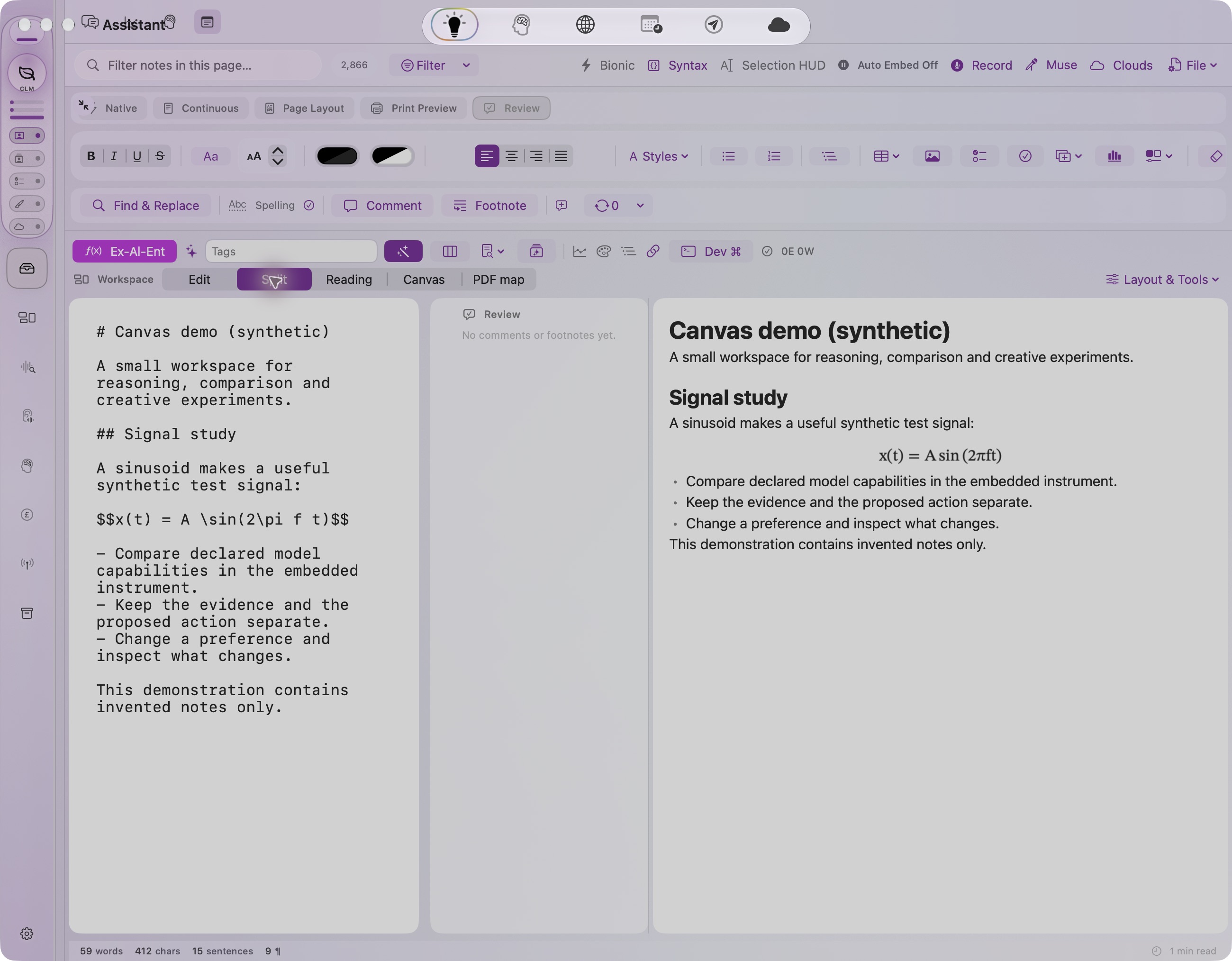
The Notes module is the part of AssistantApp a visitor would recognise first, and the part that has quietly become its workbench. It started as a plain note panel and now has three layers. The first is a word processor: a TextKit-based editor with a nine-tab ribbon, Word built-in styles, comments, footnotes, fields, mail merge, outline, page layout and print preview, opening and saving Word, OpenDocument, RTF, HTML and plain text entirely offline, with its own PDF and EPUB writers and a hand-rolled ZIP so .docx and .epub need no third-party library. The second is a reading layer: Markdown and LaTeX typeset on the device by an authored maths engine, with Edit, Split, Reading, Canvas and PDF-map modes, syntax-coloured code blocks and a repair pass for pasted text that arrived in the wrong encoding. The third, and the one the owner spent most of August and September on, is the Canvas. A note can switch into an infinite spatial surface where nineteen kinds of frame coexist: text written straight onto the surface, shapes, images, charts, drawings, code boxes that check themselves against a real Xcode project, web pages, YouTube, Discord channels, social cards, voice memos with transcripts, music scores, a DICOM viewer frame hosting the app's existing imaging code, a developer command console, an algebra trainer, a spatial study and, most recently, Live Instruments. Frames drag, resize, rotate, snap to guides, group, align and distribute; the canvas has a minimap, deep search that matches meaning as well as words, a presentation deck, PDF export and a shared transport so padlocked audio clips play on one clock. Live Instruments are the research edge: an AI proposes a small interactive instrument as data, the native app validates it, computes what it may see and do, renders it in a six-band frame, and only the user may keep a finding or append it to the note. The first instrument, an Inference Route Explorer, compares the app's AI routes by declared fit and by a bounded 48-token speed probe, and labels every value with its basis so a preference is never ranked as a measurement. All of this is built for macOS only, is uneven in how far it has been exercised at runtime, and has no public release. New native captures from a synthetic demo note now accompany the dated capability review below.
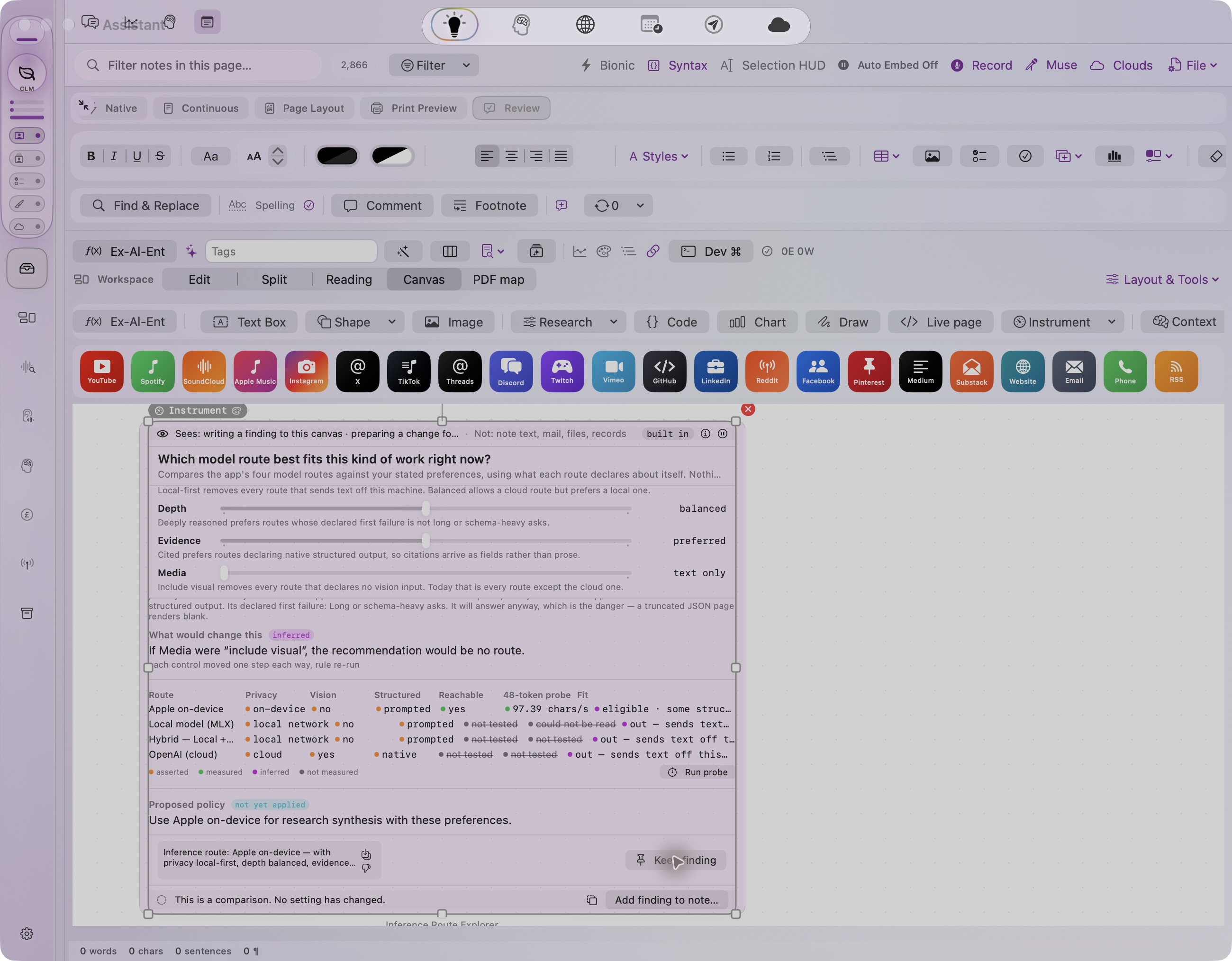
The 18 October 2026 screenshot shows the actual Notes Canvas with its built-in Inference Route Explorer, added to a newly created empty demo note while the private library was hidden. The instrument compares declared route capabilities and exposes evidence labels, a proposed policy and a Keep finding action. The displayed 97.39 chars/s value is a retained earlier probe record; no probe ran during this capture, and it is not a new timing benchmark. This verifies the visible interface for one bounded workflow, not every document, canvas or export feature.
What stands out
- Fully offline document pipeline: Word/OpenDocument/RTF/HTML round-trip, PDF pagination with headers, footers and watermark, EPUB, and an OOXML reader/writer for comments and footnotes that Apple's converter drops.
- An authored Markdown+LaTeX typesetter (fractions, radicals, matrices, big-operator limits, auto-grown delimiters) rendering at view time without any dependency.
- A working freeform canvas with nineteen live frame kinds, per-frame render isolation, smart guides, multi-select, minimap, semantic search, presentation and PDF export; a steady run of dated commits from 14 August to 9 September 2026.
- The canvas hosts the rest of the app rather than re-implementing it: ResearchControls editors (19 modules, Visual/Code JSON toggle), the DICOM viewer, Voice Memo recordings and scores arrive as frames.
- Live Instruments enforce a stated contract (AI proposes, host validates, user commits) in code: evidence tiers minted by producers, authority fields with no safe default, a gate that caps evidence-free proposals at preview, sealed web content with a passing egress load test.
- On-device note intelligence: every note analysed by the local model into title, purpose, category and embedding, filed into capped smart folders, linked to tasks, and shown as an infinite-zoom Clouds map.
Current limits
- macOS only. Nearly every Notes file is behind #if os(macOS); only the Foundation-only Instruments contract and a small platform shim compile for iOS. The iOS port was scoped but not built.
- Runtime verification is thin. Most features are 'built green, not runtime-verified' in the project's own records; the 18 October native UI capture adds a bounded demonstration, while broader proof remains build logs, headless self-tests and user crash reports that were fixed.
- The Live Instruments strand (about 16 files) was untracked by git as of 9 September 2026; the Instruments workspace commits depend on it.
- The unit tests that exist (NotesDocumentEngineTests) cannot be relied on to run: whole-suite runs hang the host app per project records; run status is unknown.
- Known open items: .docx save uses AppKit's native writer (OOXML comment injection deferred), canvas PDF export orientation unverified, math renders only in the main notes editor, not in task or map note surfaces.
Features & evidence
Word-class editor and ribbon
sourceTextKit 1 editor with nine Word-style tabs, built-in style catalogue, comments, footnotes, fields, display-only tracked changes, mail merge from CSV/JSON, macro recorder, outline pane, page layout and print preview modes.
Recorded evidence
AssistantApp/Sources/Notes/Document/{Review,Layout,MailMerge}/, Sources/Formatting/Ribbon/; branch feature/notes-word-pages-processor commits 604d2b5eb and 3abe06868 (June-July 2026, memory word-processor-notes-module, 109 days old); all eight phases recorded as 'build clean on macOS'.
Document formats
component-testedOpen and save .docx, .doc, Word 2003 XML, .rtf, .rtfd, .odt, .html, .webarchive, .txt, .md; export PDF and EPUB; hand-rolled MiniZip; OOXML package reader/writer.
Recorded evidence
DocumentFormat.swift (12 cases), DocumentFormatIO.swift, Formats/OOXML/*, EPUBWriter.swift, PDFExporter.swift; Tests/AssistantAppTests/NotesDocumentEngineTests.swift covers format round-trip, MiniZip, mail merge, HTML to Markdown, EPUB, PDF pagination (run status unknown; earlier standalone swiftc harnesses passed per memory).
PDF editing and argument map
sourcePDFKit page delete/reorder/rotate/extract, text and highlight annotations, thumbnail navigator; PDF argument-map view.
Recorded evidence
Document/PDF/{PDFEditing,PDFEditorView,PDFArgumentMap,PDFArgumentMapView}.swift; build evidence from the July 2026 memory only.
Markdown + LaTeX reading view
sourceOffline Markdown renderer and maths typesetter; Edit/Split/Reading/Canvas/PDF-map modes; fenced-code highlighting; bionic reading transform; mojibake repair; single-line bracket display math.
Recorded evidence
Notes/MarkdownLatex/ (8 files); NoteRenderMode cases at MarkdownLatexPreviewView.swift:20; commit 'Notes: offline Markdown+LaTeX renderer and embedded research modules' 15 Aug 2026 (reflog); full xcodebuild BUILD SUCCEEDED 13 Aug 2026 (memory notes-markdown-latex-module); user confirmed the port live on 13 Aug 2026 (memory; that screenshot is not on disk).
Freeform canvas
sourceInfinite spatial surface per note: 19 frame kinds (CanvasModuleRegistry), drag/resize/rotate/z-order, 8-handle chrome, multi-select and marquee, align/distribute, smart guides, write-anywhere caret, paste anything, per-frame fonts, groups, minimap, search inside widgets with semantic matching, presentation deck, PDF export, shared transport for padlocked clips.
Recorded evidence
Document/Canvas/FloatingObjectsCanvas.swift, FloatingObjectsController.swift, CanvasModuleRegistry.swift, CanvasMinimap.swift, CanvasSearch.swift, CanvasTransport.swift; reflog commits 14 Aug-4 Sep 2026 ('Notes freeform module canvas', 'infinite surface', 'render isolation', 'Minimap navigation', 'Canvas transport: padlocked clips play together'); Docs/Architecture/NotesPanelWorkspacePlan.md (status 19 Aug 2026: Phases 0-3 compiling, 'nothing runtime-verified'). Two user-reported click crashes were fixed 14 Aug 2026, which shows live use but no acceptance record.
Embedded research modules
sourceResearchControls editors (19 modules: response curve, EQ, envelope, distribution, colormap, timeline, routing, parallel coordinates, XY pad, NodeMap and more) as live, persisted, editable frames with a Visual/Code JSON toggle, inspector, demo presets and 'Publish as evidence' into the Research Evidence Graph.
Recorded evidence
Notes/Research/EmbeddedResearchModule.swift, Document/Canvas/ResearchControlInformance.swift; four full xcodebuilds BUILD SUCCEEDED 13 Aug 2026 (memory); MCP tools assistantapp_research_list/get/add/set round-trip tested 13 Aug 2026.
Note Intelligence
sourceOn-device model analyses each note (title, purpose, category, priority, embedding), SQLite index with content-hash gate, capped smart folders written back to the sidebar, axis chips, note-task matching, Clouds infinite-zoom NodeMap of notes and tasks.
Recorded evidence
Notes/Intelligence/ (14 files); BUILD SUCCEEDED 13-14 Aug 2026 (memory note-intelligence-framework); on-demand, not continuous.
Curated suggestions and Inspiration page
sourceEvidence-backed suggestions panel (papers, books via Amazon/Audible provider), an AI-made inspiration page rendered as a sealed live-page frame with a fixed house style, a compass and 4D pad to aim it, and a page kit where the model emits JSON and fixed components render it.
Recorded evidence
Intelligence/NoteCuratedSuggestions.swift, NoteSuggestionPanel.swift, NoteBookFinder.swift; Canvas/CanvasInspirationPage.swift, InspirationCompass.swift, InspirationPad4D.swift, CanvasPageKit.swift, CanvasBookKit.swift; reflog commits 19-21 Aug 2026.
Live Instruments contract
component-testedInstrumentSpec two-regime decoder, validator, runtime grant computed by the host, bridge gate with receipts and call budget, proposal/approval flow through TBActionGate, seven-state lifecycle, findings with staleness and disagreement, saved templates, bounded speed probe, sealed WKWebView egress (content rule list, CSP, size cap).
Recorded evidence
Notes/Instruments/*.swift (Foundation-only), Document/Canvas/{InstrumentFrame,InstrumentApprovalHost,InstrumentEgress,InstrumentProbeRunner}.swift; InstrumentSelfTest.run() ALL GREEN headless, September 2026 (this session); egress load test executed and passed, September 2026; TBActionGate no-evidence inversion fixed with red-team case 5b (TBRedTeamHarness.swift). Files were untracked in git as of 9 Sep 2026 (memory instruments-workspace-roadmap). Never launched in-app by an agent session.
Inference Route Explorer instrument
component-testedThe first shipped instrument: compares appleOffline, localServer, hybrid and openAI routes by declared capability table and user preference, runs a 12-word 48-token probe (chars/s, never ranked), keeps findings that survive re-evaluation, and can append a finding to the note only after approval.
Recorded evidence
Notes/Instruments/InferenceRouteExplorer.swift (capability table reviewed 2026-09-04, line 48), InstrumentProbe.swift, InstrumentTemplateStore.swift; covered by InstrumentSelfTest; loopback-only probe since 9 Sep 2026 (InstrumentProbeRunner.swift:114).
Instruments workspace
sourceApp-level Instruments panel (library / board / focus) over an instrument library store, with migration from note canvases and a template-keyed host.
Recorded evidence
Notes/Instruments/{InstrumentIdentity,InstrumentLibraryStore,InstrumentNoteMigration,InstrumentsWorkspaceSession,InstrumentHost,InstrumentBoardView}.swift; PanelRegistry.swift:99 'panel.instruments'; commits 6be050c9c (Phase 1) and 1b3e16933 (Phases 2-3) on 9 Sep 2026 on branch claude/dicom-neuromodules-qa-2026-08-24, green shared build, zero warnings (memory). Headless proof 14/14 for Phase 1.
Cross-module frames
sourceDICOM viewer frame, Voice Memo and Score frames with harmonic shading, Dev Command console frame, Ex-Al-Ent algebra trainer (AI translates a scenario, deterministic code solves and verifies), Spatial Study (integer-millimetre room geometry), Inference Experiment (bounded text experiment with hashed outputs).
Recorded evidence
Canvas/DICOMWidget.swift (commit 'DICOM as a canvas frame' 26-27 Aug 2026), VoiceMemoWidget.swift and ScoreWidget.swift (commit 19 Aug 2026), DevConsoleWidget.swift, AlgebraTrainingModule.swift, SpatialStudyFrame.swift, InferenceExperimentFrame.swift; build or runtime evidence for the algebra, spatial and experiment frames: unknown.
Apple Notes import and bridge, smart paste, checklists
sourceRead Apple Notes via immutable SQLite open, AppleScript bridge for create/edit with Automation permission, clipboard HTML to Markdown smart paste, '- [ ]' checklists, pinned and locked notes.
Recorded evidence
Sources/Utility/NotesImportedNote.swift, AppleNotesBridge.swift, Document/Formats/HTMLToMarkdown.swift; recorded fixes July-August 2026 (memories word-processor-notes-module, notes-markdown-latex-module).
iOS Notes and canvas
plannedNotes panel and canvas on iPhone/iPad.
Recorded evidence
Only Platform/PlatformCompatibility+Notes.swift shim and the Foundation-only Instruments files type-check for iOS (September 2026, this session); scoping questions were never answered; no iOS UI exists for Notes.
Review updates & corrections
- The 17 October biography covered Notes only as 'Assistant shell: tasks, notes...' and one row in the wider module map ('Notes and canvas: Markdown, mathematical notation, a freeform canvas, document editing and note-intelligence work'). This is the first dedicated profile; nothing in it contradicts the biography.
- Correction to an internal document rather than the biography: NotesPanelWorkspacePlan.md (19 Aug 2026) counts 13 canvas frame kinds; CanvasModuleRegistry.swift now lists 19 (group, livePage, score, voiceMemo, dicom, devConsole, algebraTrainer, instrument added since).
- The biography's Creative Apps list names 'Instruments' as a gallery item; the source confirms an app-level panel 'panel.instruments' with library/board/focus modes, committed 9 Sep 2026.
- Git state unchanged since the biography: HEAD 2d978954f (5 Oct 2026) on claude/dicom-neuromodules-qa-2026-08-24; the Live Instruments strand remains untracked and this session's September work is uncommitted.
- The 18 October 2026 screenshot shows the actual Notes Canvas with its built-in Inference Route Explorer, added to a newly created empty demo note while the private library was hidden. The instrument compares declared route capabilities and exposes evidence labels, a proposed policy and a Keep finding action. The displayed 97.39 chars/s value is a retained earlier probe record; no probe ran during this capture, and it is not a new timing benchmark. This verifies the visible interface for one bounded workflow, not every document, canvas or export feature.
Workflow walkthrough
A guide to the native workflow. These steps describe the app; only the recordings and images embedded on this page are available as website demonstrations.
- Open a note in the Notes panel and switch the render mode picker to Canvas. The note body stays available in Edit or Split; the canvas is a dot-grid surface with an add-frame toolbar.
- Click anywhere and start typing: a bare caret becomes a text frame. Paste a picture onto the text and the text flows around it; drag a social chip from the palette to drop a link card.
- Add a Module frame and choose Response Curve. Drag points on the curve, then flip the frame to Code and see the same model as JSON; edit a value and apply it back.
- Insert an Instrument: Inference Route Explorer. Move the Privacy control to local-first and read the consequence line; the cloud routes drop out and every remaining value shows its basis chip (asserted, measured, preference).
- Press Run probe. A single 48-token timing appears labelled 'one sample, shown not ranked'. Pin a finding; it stays attached with a staleness mark if the table changes.
- Choose 'Add finding to note'. The approval sheet shows what will be appended and the prior state; confirm, and the sentence lands in the note body with a revert affordance. Export the note as PDF from the file menu.
- Status: proposed capture that does not exist. Nothing here is playable on the website and there is no existing native capture; the steps are reconstructed from source and this session's records, not from a run.
Planned captures · not yet available
- Canvas mode on a synthetic note: text, a response-curve module, a chart and an Inference Route Explorer frame with basis chips visible.
- PDF exported from the same synthetic note, showing pagination, header/footer and the instrument's title, question, settings and kept findings as printed by PDFExporter.
- 30-second screen recording of the six-step walkthrough above.