Inside the project
Prepared with the project’s development agent from source and retained evidence. This is a project-owner assessment, not an independent customer review. Dated checks were not rerun for this website.
Audio Scene Canvas is a node canvas inside AssistantApp for assembling an audio scene out of the app's own audio modules — NoiseColour character, the Acoustician masker, Semantic Monster and Synth, vocoders, spectral EQ, and the shipped instrument and MIDI-effect extensions — then exploring it with macros, MIDI and expressive controllers. It is deliberately not Max/MSP: where open-ended patching gives you everything and promises nothing, this canvas ships a curated set of modules whose execution lane, real-time safety, export eligibility and readiness on THIS machine are all known to the host. The practical payoff is that the canvas can tell you what will actually play — here, and in Logic — before you invest hours in a scene. Two verdicts are kept deliberately apart: 'plays here?' (is an implementation registered and the plug-in present on this Mac) and 'Logic?' (can this chain travel into the one fixed Assistant Scene Rack, or does it need host plug-ins). A scene is a document; third-party plug-ins are referenced by component id and never copied; separation results stay at family level, with the user choosing a candidate before it becomes a source. The engineering discipline is the interesting part. A module cannot declare its own execution lane — lane, ports, ranges and latency come from a registry that mints every manifest through a private initialiser. Readiness has no field in the document at all; it is computed from registration or from probing the live plug-in. Control values reach audio only as a flat, clamped snapshot on a 25 Hz tick, so a slider, an armed eye-tracking route, a MIDI controller and an approved AI proposal all arrive by the same door or not at all. Arming is not stored in the file, so opening a scene can never arm a sensor. The honest state is that this is a thoroughly source-complete and build-verified subsystem that has never been exercised as live audio. It compiles into the app, its document and canvas layers pass two headless suites that bite under mutation, the rack's masker kernel passes a ground-truth self-check at eleven block sizes, and the Voice Memo handoff has passing unit tests — but nobody has yet sat down, pressed play and listened to a scene end to end. The capability table distinguishes those levels rather than blurring them.
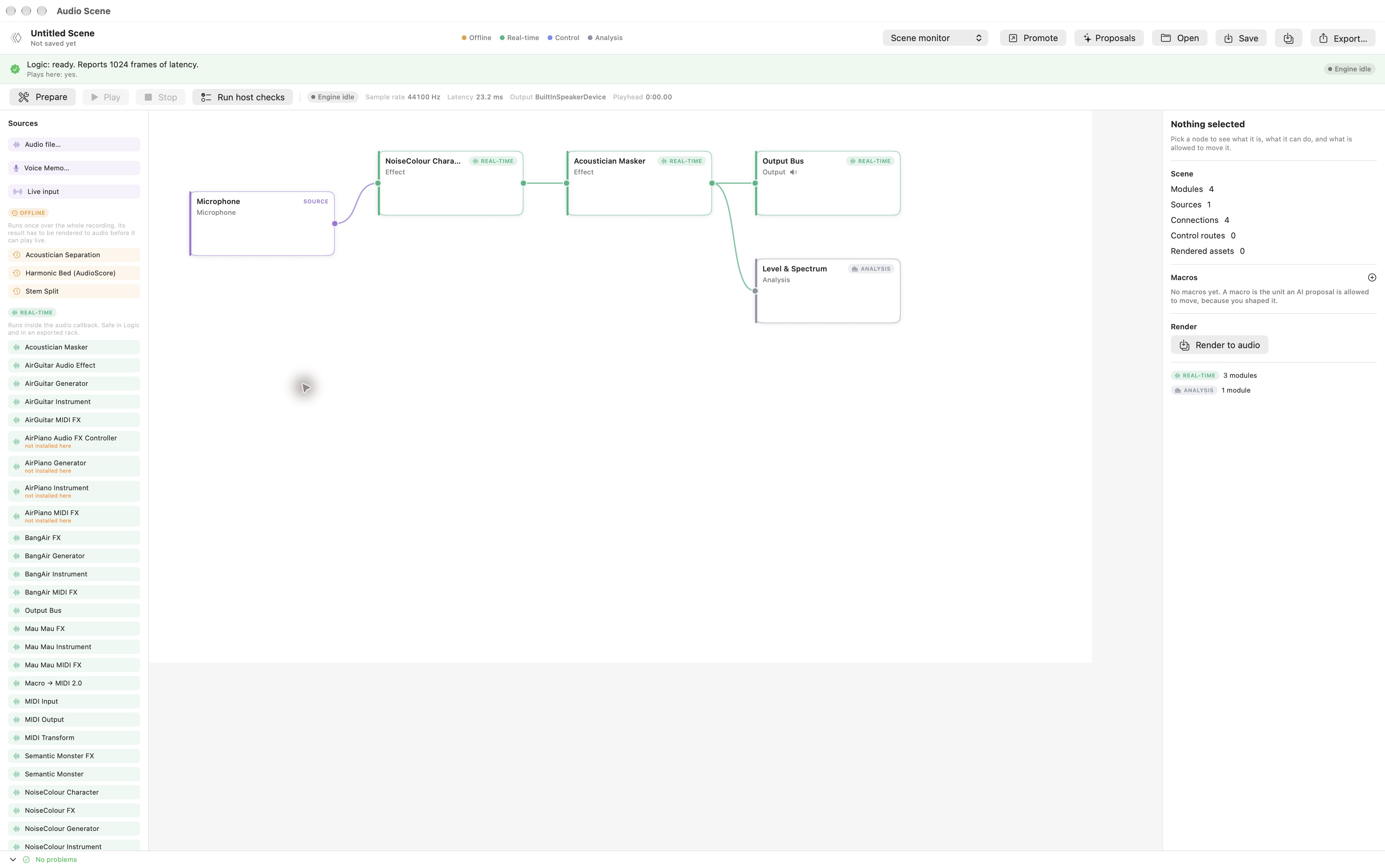
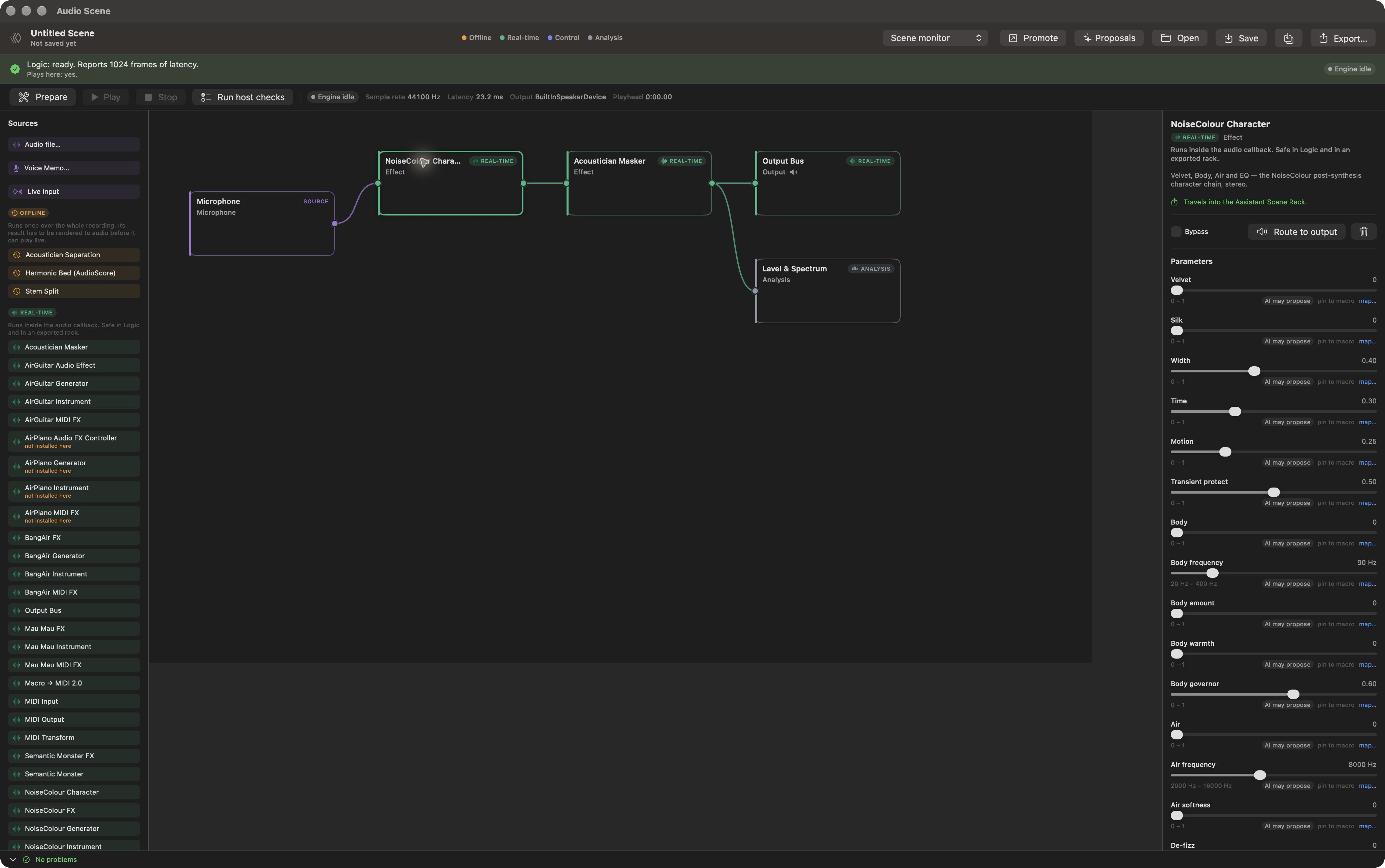
The 18 October 2026 media update adds actual native screenshots of the routing canvas and NoiseColour Character inspector. The graph and parameter controls are visible in the running app, with the engine idle. No microphone was started and no scene was played, rendered or exported during capture. These images establish the native interface, while the end-to-end audio and Logic export limitations below remain open.
What stands out
- Readiness is computed, never asserted: readiness(for:) returns .executable only when the hosting layer registered an implementation, or a probe read the live AUParameterTree and installed a verified manifest. A manifest has no readiness field to lie with.
- Two verdicts kept apart — one answers 'Logic?', the other 'plays here?'. Neither is Codable, so a saved file cannot smuggle a stale claim; it carries a separate recorded-claim type instead.
- Four hard execution lanes with exactly one audio-callback-safe case. Model inference, file analysis and GPU work are structurally barred from the realtime lane.
- Nothing reaches audio except as a flat, clamped parameter snapshot: sliders, armed ocular routes, MIDI, macros, automation and approved AI proposals all land in the same snapshot or do not arrive. The control router is pure and holds the last value rather than dropping to zero.
- MIDI 2.0 resolution end to end, with downgrade to MIDI 1.0 bytes only at a destination that cannot take an event list — and events with no MIDI 1.0 form counted rather than silently dropped.
- A curated palette rather than a plug-in wall: lane groups show only what the build ships, while the several hundred Audio Units and VST3s on the machine are reached through a capped search, each probed on demand when the user places that one.
- The rack is a fixed serial chain of first-party stages, so 'export to Logic' can never mean 'compile an arbitrary graph'. The compiler refuses hosted units, offline modules and fan-in/out in words, and the same sentence appears in the export handoff.
- AI access is laddered — metadata, then declared parameters, then user-pinned macros. Opaque vendor state is not a representable case, so no assistant proposal can name it. All 16 MCP tools are tiered read-only / proposal / user-confirmed and pass a Thousand Brains action gate.
Current limits
- No end-to-end audio runtime verification; native interface captured on 18 October 2026. No live audio session, no listening test, no promoted render, no MIDI delivered to a real instrument. Compiling, headless suites and unit tests prove well-formedness, not behaviour. This is the biggest gap and the next priority.
- The Logic-visible .appex does not exist: 'AssistantSceneRackAUv3' occurs 0 times in project.pbxproj. The Info.plist and entitlements are prepared and the one-time Xcode target step is documented, but until someone performs it the rack is in-app only.
- No VST3 host. VST3 plug-ins are discovered and referenced so the document is honest about what the user reached for, and readiness refuses to play them; Logic loads Audio Units only.
- MIDI wires carry channel-voice messages only (UMP types 0x2 and 0x4). SysEx, per-note controllers and RPN/NRPN are not routed.
- Promotion into the internal DAW refuses, because that DAW has no import API in this build. Voice Memo is the working promotion target.
- The shipped Acoustician masker kernel (shared with the Acoustician AU) still grows Swift arrays inside process(); the allocation-free rewrite lives in the rack only. The registry evidence says so rather than hiding it.
- The ocular control lane has never been camera-run in this module, consistent with the wider ocular work. It is expression, never diagnosis, with a 120 ms smoothing floor re-applied on decode.
- On this Mac the Audio Unit component API currently returns only 8 of the app's own components although Launch Services lists 11 extensions as registered — a registrar cache lag rather than app logic, but it means some shipped modules read as not installed.
Features & evidence
Offline preparation lane
sourceAcoustician separation, a four-stem DSP split and a harmonic-bed analyse/resynthesise — all represented as offline work, with family-level claims the user must accept before a candidate becomes a source.
Recorded evidence
SceneOfflineRenderer and SceneOfflineExecutors, build-verified 2026-09-06. The separation-honesty contract is covered by the document suite; no offline run has been executed on real material in this module.
Control lane — MIDI, ocular, vocal and pulse macros
sourceBounded macros the user arms and routes to parameters. Vocal macros read energy, presence and clarity from the app's perceptual snapshot; the pulse macro follows a Euclidean clock the user runs.
Recorded evidence
SceneControlHub 25 Hz tick, build-verified 2026-09-06. Router hold semantics and the 120 ms smoothing floor are covered headlessly. Never camera-run.
16 MCP tools in three tiers, behind an action gate
sourceThe assistant can describe a scene, compare options and propose changes; it cannot apply anything. A tier-3 tool only enqueues a confirmation the user accepts in the panel.
Recorded evidence
16 CAMCPTool conformances counted in AudioSceneMCPTools.swift (verified 2026-10-18); appended to the live CAMCPToolRegistry.defaultTools(); AudioSceneToolGate requests .propose authority and refuses below it. Build-verified 2026-09-06.
Voice Memo to Audio Scene handoff
installed-testedThe user selects a region in Voice Memo and chooses Open in Audio Scene; the region arrives as a scene source — baked to its own WAV for a region, referenced for a whole take.
Recorded evidence
BUILD SUCCEEDED and TEST EXECUTE SUCCEEDED on 2026-09-06: 28 of 28 passing across VoiceMemoClipTaxonomyTests (19) and VoiceMemoSceneProvenanceTests (9). A second adversarial review raised 22 items, 13 fixed. The runtime handoff has still never been exercised.
Panel entry points
sourceAudio Scene opens as its own window from the Panels menu and as an embedded pane in the creative gallery, described there as: assemble a scene from the app's own audio modules; see what will play in Logic before you build it.
Recorded evidence
Window AssistantAppApp.swift:2312 with hosting bootstrap :2317; gallery tile MiddleTasksPane.swift:1247 and embedded case :1676-1681; PanelRegistry.swift:43. All present in the committed tree, verified 2026-10-18 — the September 'declared but not wired' gap is closed.
Logic-visible .appex for the rack
plannedWould make the Assistant Scene Rack loadable in Logic and other AUv3 hosts, as the destination the whole export path is designed around.
Recorded evidence
Prepared Info.plist and entitlements in AssistantSceneRackAUv3/ with TARGET_SETUP.md; 'AssistantSceneRackAUv3' occurs 0 times in AssistantApp.xcodeproj/project.pbxproj (verified 2026-10-18), so the target genuinely does not exist.
VST3 referencing without a host
component-testedVST3 plug-ins on the machine are found and named so the document can record what the user reached for; readiness refuses to play them, and a chain containing one is not reported as Logic-ready.
Recorded evidence
SceneVST3Discovery with a recursive, bundle-aware scan. Suite assertions pin that a referenced VST3 never reaches the curated palette, never claims rack export, and that its id is independent of install location. Suites green 2026-09-06.
Analysis lane
sourceLevel and spectrum plus a stereo-field card (correlation and width), read from one lock-free tap rather than a second analysis path.
Recorded evidence
AudioSceneAnalysisTap and AudioSceneAnalysisWorker, build-verified 2026-09-06. Never observed against live audio.
Offline preparation lane
sourceAcoustician separation, a four-stem DSP split and a harmonic-bed analyse/resynthesise — all represented as offline work, with family-level claims the user must accept before a candidate becomes a source.
Recorded evidence
SceneOfflineRenderer and SceneOfflineExecutors, build-verified 2026-09-06. The separation-honesty contract is covered by the document suite; no offline run has been executed on real material in this module.
Control lane — MIDI, ocular, vocal and pulse macros
sourceBounded macros the user arms and routes to parameters. Vocal macros read energy, presence and clarity from the app's perceptual snapshot; the pulse macro follows a Euclidean clock the user runs.
Recorded evidence
SceneControlHub 25 Hz tick, build-verified 2026-09-06. Router hold semantics and the 120 ms smoothing floor are covered headlessly. Never camera-run.
16 MCP tools in three tiers, behind an action gate
sourceThe assistant can describe a scene, compare options and propose changes; it cannot apply anything. A tier-3 tool only enqueues a confirmation the user accepts in the panel.
Recorded evidence
16 CAMCPTool conformances counted in AudioSceneMCPTools.swift (verified 2026-10-18); appended to the live CAMCPToolRegistry.defaultTools(); AudioSceneToolGate requests .propose authority and refuses below it. Build-verified 2026-09-06.
Voice Memo to Audio Scene handoff
installed-testedThe user selects a region in Voice Memo and chooses Open in Audio Scene; the region arrives as a scene source — baked to its own WAV for a region, referenced for a whole take.
Recorded evidence
BUILD SUCCEEDED and TEST EXECUTE SUCCEEDED on 2026-09-06: 28 of 28 passing across VoiceMemoClipTaxonomyTests (19) and VoiceMemoSceneProvenanceTests (9). A second adversarial review raised 22 items, 13 fixed. The runtime handoff has still never been exercised.
Panel entry points
sourceAudio Scene opens as its own window from the Panels menu and as an embedded pane in the creative gallery, described there as: assemble a scene from the app's own audio modules; see what will play in Logic before you build it.
Recorded evidence
Window AssistantAppApp.swift:2312 with hosting bootstrap :2317; gallery tile MiddleTasksPane.swift:1247 and embedded case :1676-1681; PanelRegistry.swift:43. All present in the committed tree, verified 2026-10-18 — the September 'declared but not wired' gap is closed.
Logic-visible .appex for the rack
plannedWould make the Assistant Scene Rack loadable in Logic and other AUv3 hosts, as the destination the whole export path is designed around.
Recorded evidence
Prepared Info.plist and entitlements in AssistantSceneRackAUv3/ with TARGET_SETUP.md; 'AssistantSceneRackAUv3' occurs 0 times in AssistantApp.xcodeproj/project.pbxproj (verified 2026-10-18), so the target genuinely does not exist.
VST3 referencing without a host
component-testedVST3 plug-ins on the machine are found and named so the document can record what the user reached for; readiness refuses to play them, and a chain containing one is not reported as Logic-ready.
Recorded evidence
SceneVST3Discovery with a recursive, bundle-aware scan. Suite assertions pin that a referenced VST3 never reaches the curated palette, never claims rack export, and that its id is independent of install location. Suites green 2026-09-06.
Analysis lane
sourceLevel and spectrum plus a stereo-field card (correlation and width), read from one lock-free tap rather than a second analysis path.
Recorded evidence
AudioSceneAnalysisTap and AudioSceneAnalysisWorker, build-verified 2026-09-06. Never observed against live audio.
Review updates & corrections
- The 17 October collection carried Audio Scene as a single table row in assistantapp-collected.md:358 ('Scene engine, offline renderer, GAW counterpart to Voice Memo; headless harness exists'). That stays accurate but understates the verification state; this is the first detailed entry.
- CORRECTION of scale: the tree holds 57 Swift files under AudioSceneCanvas plus 6 in AudioSceneRack. The '30 canvas files' figure in the module's own doc badge counts top-level files only and dates from the 2026-09-24 auto-assessment.
- An adversarial review on 2026-09-05 (115 agents over 7 dimensions, every finding put to 3 independent refuters) confirmed 30 defects, all since repaired. Four were severe: the rack masker discarded input above roughly 1280-frame blocks, its dry tap was read undelayed so Mix combed instead of crossfading, its output queue underran off the hop grid, and a velocity-0 note-on was encoded as a MIDI 2.0 Note On — which that protocol does not read as a release, so every key release stranded a note.
- A crash on 2026-09-06 traced to bare os_unfair_lock_s values held in Swift stored properties and taken with '&' — a form that can lock a temporary copy and exclude nothing, corrupting the heap around a shared class reference. Every lock in the router is now an OSAllocatedUnfairLock (verified still so, 2026-10-18).
- The palette had been flooding: it listed every discovered plug-in, roughly 800 entries, none probed and so all unusable. Lane groups are now curated, and discovered plug-ins are searched and probed on demand.
- AudioSceneSourceOffer and AudioSceneSourceInbox were folded into SceneHostingContracts.swift to avoid an Xcode 26 filesystem-sync drop race on the most-recently-added file; the standalone file is gone. Both build errors reported during that work are resolved — one was the sync race, the other a missing 'import ResearchControls'.
- The Voice Memo side of the handoff is now build-verified and unit-tested: 28 of 28 passing on 2026-09-06. That partially contradicts the older standing note that AssistantAppTests cannot run — pure-logic suites do execute with -only-testing and a private DerivedData.
- The September 'declared but not wired' concern is closed: the window, the gallery tile, the embedded pane and both hosting-bootstrap calls are all in the committed tree.
- The ccx mission 'Build Canvas Audio Scene / Instrument Rack' closed on 2026-10-16 with no runtime verification recorded, so 'built and checked but never heard' remains the honest headline.
- The 18 October 2026 media update adds actual native screenshots of the routing canvas and NoiseColour Character inspector. The graph and parameter controls are visible in the running app, with the engine idle. No microphone was started and no scene was played, rendered or exported during capture. These images establish the native interface, while the end-to-end audio and Logic export limitations below remain open.
Workflow walkthrough
A guide to the native workflow. These steps describe the app; only the recordings and images embedded on this page are available as website demonstrations.
- Open Audio Scene from the Panels menu, or the Audio Scene tile in the creative gallery. The palette on the left is grouped by execution lane, so you can see what KIND of work a module is before you pick it.
- Add a source — an audio file, a Voice Memo, the microphone or system audio — then drag NoiseColour Character and an Output Bus onto the canvas and wire source into character into bus.
- Read the verdict strip. It states separately whether the scene plays on this machine and whether it could travel to Logic, naming any module that would block either.
- Pin a macro to the character stage's parameters, arm it and move it. Values reach audio only through the clamped snapshot, and the inspector shows the route and its health.
- Search the plug-in browser for an installed Audio Unit by name and place it; it is probed as it lands, which reads its real parameter list and turns it from 'found' into usable.
- Export. The scene writes a document, a restricted .assistantRackPreset, rendered assets and a Logic handoff note — or refuses in words, naming the stage the rack cannot take.
Planned captures · not yet available
- PROPOSED capture: the Audio Scene canvas with a three-node chain (source, NoiseColour Character, Output Bus), lane badges visible in the palette, and the dual verdict strip showing the 'plays here' and 'Logic' answers side by side. This is the single clearest image of the product idea.
- PROPOSED capture: the plug-in browser after a search, showing a hosted Audio Unit with the 'checked when you place it' subtitle — illustrating on-demand probing and the curated-versus-discovered split.
- PROPOSED capture: the export sheet refusing a chain the rack cannot take, with the refusal sentence visible — the 'tells you before you invest' promise in one frame.
- PROPOSED render: a short before/after of one scene — dry source, then the same source through NoiseColour Character and the masker. DOES NOT EXIST: no scene has ever been rendered, and [local evidence archive] Support/AssistantApp has no AudioScenes folder at all.
- NOT FEASIBLE as a web demo. The scene document layer is Swift (Foundation/SwiftUI) and the host is AVAudioEngine; none of it runs in a browser. Any website demo must be a native capture rather than a playable widget.