Inside the project
Prepared with the project’s development agent from source and retained evidence. This is a project-owner assessment, not an independent customer review. Dated checks were not rerun for this website.
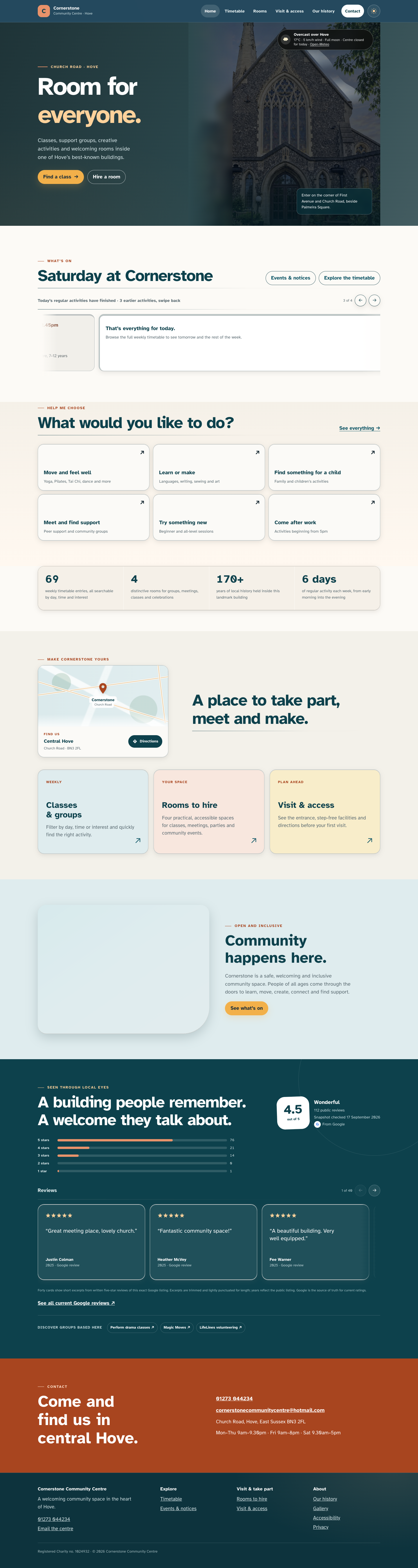
Built for a busy community centre in Hove, this is a small custom website on Cloudflare rather than WordPress. The weekly timetable drives everything: what's on today, a filterable timetable, and a page for every activity that search engines can read. The homepage photograph follows Hove's real weather and the centre's opening hours. The part staff use most is the private editor. Every change goes to a draft site first. Before anything reaches visitors, Push live opens each page and loads each picture on the real public site. Every version of the whole site is kept for six months and can be restored in one step. In its first week in use, the check found a real fault that had been invisible since launch: the pictures shown when someone shares a page were broken. A separate volunteer app, Shift Companion, puts the reception checklists, today's groups and the emergency procedures on a phone, and works offline.
What stands out
- Draft-first publishing: a change never reaches visitors until someone pushes it live
- Before pushing, the check renders every page and loads every picture on the actual public site
- One-step rollback to any snapshot from the last six months
- The timetable drives the today view, the filterable timetable, activity pages and their search-engine data
- Opening hours and church services shape the homepage photograph, and real weather and satellite data set its sky
- Shift Companion works offline, never shows the alarm code or key locations on a locked screen, and its Siri answers come from on-device search
Current limits
- Showing a page again that the lean public build left out needs a developer rebuild
- Single shared management password; no per-person staff accounts
- Several timetable prices and rooms are unconfirmed; activity photos are placeholders until organisers give permission
- The AI website helper is switched off and untested with a real ChatGPT or Claude account
- Shift Companion is unreleased: it runs in the simulator, but sign-in by email code hasn't been tried with a real volunteer address
Features & evidence
Public website
releasedVisitors browse today's activities, the timetable, activity pages, rooms, and visit and access information
Recorded evidence
Live on cornerstonecommunitycentre.com since 1 Oct 2026; site checks passed after each deploy, the last confirmed result 8 Oct (the 17 Oct check was not recorded)
Management editor
releasedStaff edit the timetable, banners, page text, visual page layouts and activity details, and can hide a page or part of one
Recorded evidence
Running at the private editor address; used by centre management (Paul's 17 Oct email)
Time Machine
releasedStaff browse a timeline of whole-site snapshots, preview one, put it back, and undo
Recorded evidence
Commit d98df5a; tested locally end to end and deployed 8 Oct 2026
Push live with pre-live check
releasedPublish goes to the draft; Push live checks every page and picture, then shows what changes
Recorded evidence
Commit 2d89393, deployed 8 Oct 2026; management used it in production and reported its warnings on 17 Oct
Fix for sharing pictures
releasedThe pictures shown when a page is shared now point to the public site's renamed picture files
Recorded evidence
Commit 34f0ed4; the build check passed (11 of 11 picture addresses present); deployed 17 Oct; the check after deploying is not recorded
AI website helper (MCP connector)
component-testedA manager connects their own ChatGPT or Claude account; it can check the site and make limited draft edits, and changes go live only after the full check passes
Recorded evidence
Commits 28b330c and f429ea4; local OAuth and tool tests 8–9 Oct; deployed but switched off
Shift Companion (web app and iOS)
component-testedVolunteers work through checklists, a today timeline, payment and loan logs, emergency procedures and the handbook
Recorded evidence
The iOS README says 'builds and runs' in the simulator; no release; TestFlight is planned
Entrance noticeboard
sourceA 'Today at Cornerstone' design for a screen in the entrance
Recorded evidence
Private mock-up pages; not installed on any screen
Review updates & corrections
- None to the software since 17 Oct; no new commits or deploys in this session.
- Correction to how the 17 Oct fix should be described: the check found a real, invisible fault (broken sharing pictures since 1 Oct), not false alarms. The fix is deployed but its check after deploying isn't recorded, so call it 'fix deployed', not 'verified'.
- Screenshot clearance: the homepage renders show Google reviewers' names, so crop or blur them before use.
Workflow walkthrough
A guide to the native workflow. These steps describe the app; only the recordings and images embedded on this page are available as website demonstrations.
- A manager opens the editor and adds a banner: 'The lift is out of order until Friday'.
- Publish: a popup says it's on the draft only; they open the draft site and see the banner.
- Push live: the check runs through about 14 pages and 120 pictures and lists 'Banners: lift notice added'.
- They confirm, and visitors see it within about a minute.
- Next day, in the Time Machine, they choose 'Make this the public website' on the earlier snapshot to take the banner down.
Planned captures · not yet available
- Publish → popup → check → Push live → rollback, using test data
- Shift Companion checklist and today screens in the simulator, with demo content
Development biography · earlier archive
Development profile compiled from project source and retained records in October 2026. Dates and test results describe those records; they do not imply a new build, live acceptance test or public release.
Profile A — Cornerstone website and management editor (flagship)
Biography
Cornerstone sits in a former church on the corner of First Avenue and Church Road, Hove. On any weekday the building hosts yoga, pre-school groups, language classes, support groups, martial arts, choirs and private bookings. The old WordPress site could not keep up. The programme lived in several places that disagreed: the website, a paper copy at reception, and the volunteers' induction booklet. Changing a class time meant editing pages by hand, and visitors could not easily find out what was on today.
The rebuild started from one idea: the timetable is the centre's real content, so everything should grow from it. Management edit one structured timetable in a private editor. The public site renders from it on every request. Today's activities appear on the homepage. The timetable page filters by day, time and interest. Each activity gets its own page, with a title, description and structured data that Google can read, including the next date it actually meets (monthly, fortnightly and course patterns included). Rooms, visiting and access, history, events and gallery pages complete a deliberately small public site.
Two builds share one codebase. The full "draft" site (v3) is what management edit and preview. A lean public build (v4) is generated from it: pictures are converted to WebP and given fingerprinted names, hidden pages and sections are cut out, and caching is tuned. The public site went live on cornerstonecommunitycentre.com on 1 October 2026, after a domain and DNS transfer from WordPress to Cloudflare. Old WordPress addresses redirect to their new equivalents so earlier links still land.
The editor is where most of the distinctive work is. Centre staff sign in with the management password; the site administrator has a separate password. The editor has these parts:
- a Timetable tab with validation;
- banners in two designs and seven site colours;
- a text list and a visual page editor (click to select, double-click to type);
- an activity-details editor for each class's picture and description;
- a picture library;
- "Pages & settings" for hiding a page or section without deleting it;
- a chat channel between management and the developer.
The editor never writes HTML for staff. A banner, a hidden page or a corrected sentence is stored as data and laid over the built pages as they are served.
In October 2026 one evening's mistaken publish broke the live site with no way back. The response was a "Time Machine" and a publishing gate:
- Snapshots: every publish, and every night, the whole published state is saved as one JSON snapshot and kept six months.
- Draft first: publishing now goes to the draft site only, and a popup asks what next: open the draft, push live, or undo the publish.
- Pre-live check: Push live first asks the public site itself to render each page with the proposed change and load every picture, then says what will change for visitors.
- Rollback: any earlier snapshot can be previewed on the draft site through a signed link, put back into the draft, or made the public site again in one step.
On 17 October the check flagged six broken pictures. They turned out to be a genuine, previously invisible fault: the social-sharing image addresses still used pre-migration picture names, so shared links showed no picture. The fix was built and deployed the same day.
Finally, a "website helper" lets a manager connect their own ChatGPT or Claude account as an MCP connector (OAuth sign-in with the editor password). It is off by default, and the administrator ticks which abilities it may use:
- check the site;
- add banners in house style;
- correct exact words;
- adjust a timetable entry;
- upload a photo, with consent questions and location data stripped;
- push live, only after the full check passes.
Fixes only work during opening hours and within daily limits, and the developer is emailed whenever something goes live.
A concrete journey. It's Saturday morning and the lift has failed.
- The duty manager signs in to the editor and opens Banners.
- They write a short alert in coral, on the home page, ending Friday, and publish.
- A popup explains it is on the draft only; they open the draft and see the strip.
- They press Push live. The check runs through fourteen pages and about 120 pictures, reports all clear, and lists "Banners: lift notice added".
- They confirm, and within a minute visitors see it.
- If they had made a mistake, the Time Machine would show the previous public version, ready to restore.
What a visitor can see or try
- Live timetable filtered by day, time and interest, with cancellations and notices.
- "Today at Cornerstone" on the homepage.
- Activity pages, with structured data search engines can read.
- Homepage hero photograph that changes with Hove's actual weather and daylight. It draws on Open-Meteo, plus a separate satellite cloud reader built on EUMETSAT data. The stained-glass windows light for church services, and the building appears open or closed according to opening hours.
- Rooms with hire information and a free-times guide (the guide's room placements are labelled best guesses).
- Banners for one-off notices.
- Light/dark theme switch.
Staff-only (not publicly demonstrable): the editor, Time Machine, Push live, and the helper.
Technical foundations
- Runtime: Cloudflare Workers with HTMLRewriter streaming. KV holds published content and snapshots; D1 holds uploaded pictures and shift records. Editor-to-site calls use service bindings; the Worker records its version metadata.
- Shared modules (
website/shared/*.mjs) define banner rules, visibility, activity sheets, page sections and the Time Machine format, so the editor and the site cannot drift. - Dependencies, not authored:
@cloudflare/workers-oauth-provider0.10.4,@modelcontextprotocol/sdk1.30.1,zod4.6.5,@anthropic-ai/sdk, Wrangler. Weather data from Open-Meteo; satellite data from EUMETSAT. - Build:
website/tools/build-v4.mjsproduces the lean site .
Maturity by feature (dated)
| Feature | Tested | Deployed |
|---|---|---|
| Public site on own domain | site check transfer.sh verify passing | live since 1 Oct 2026 |
| Activity SEO, sitemap | manual | live early Oct 2026 |
| Time Machine (snapshots, preview, restore) | local end-to-end (8 Oct) | deployed 8 Oct 2026 |
| Push live gate and pre-live check | local end-to-end; used by management in production (17 Oct report) | deployed 8 Oct 2026 |
| Website helper (MCP) | local OAuth and tool tests (8–9 Oct) | deployed but switched off |
| Sharing-picture fix | build check: all 11 full picture addresses present | deployed 17 Oct 2026 |
| Entrance noticeboard | — | private page, not on a screen |
Roadmap (not built)
- Try the helper with a real ChatGPT/Claude account, then decide whether to switch it on.
- Turn the entrance noticeboard mock-up into a real screen, with a public kiosk address.
- Add "room for this date only" in the timetable.
- Hand the centre a Google account and Google Business Profile.
- Put Cloudflare Access in front of
shifts..
Known limits
- Un-hiding a page that the lean build cut out needs a developer rebuild; the pre-live check warns about it.
- The timetable still has unconfirmed prices and rooms; some organisers' websites disagree with the timetable.
- Activity photos are open-licence examples or labelled generated images until organisers give permission.
- The editor needs a password; there are no per-person staff accounts.
FAQs
- Can staff break the public site? Not by publishing alone: changes go to a draft and are checked before going live, and every version can be restored.
- Is it WordPress? No. It is a small custom site on Cloudflare, rendered from structured content.
- Does the AI helper edit freely? No. It is off by default, limited to ticked abilities, house style and opening hours, and everything goes through the same check and undo.
- Does it track visitors? No analytics or trackers were added; the weather is always for Hove, not the visitor's location.
Profile B — Cornerstone Shift Companion (volunteer app)
Biography (summary, ~350 words; source-backed but shorter for lack of screenshots): Both builds read shared/checklist.json and shared/programme.json, so the web and iPhone versions cannot drift (./sync.sh --check).
Features :
- opening and locking-up checklists, room by room;
- a "Today" timeline built from the programme;
- repeatable event logs;
- booking requests as swipe pages;
- per-customer payment checklists;
- key and equipment loans, linked to activities, with return reminders;
- the full 14-section induction handbook, searchable;
- emergency procedures with dialling numbers;
- the last 30 shifts.
Privacy choices worth stating:
- Notifications on a locked phone only quote safe labels, never the alarm code or key locations.
- Siri answers come from an on-device search of the handbook with no AI service, and Siri never speaks the alarm code.
- Shift handover to management is off by default and encrypted when used.
- Eleven "[to confirm]" items from the booklet are kept visible rather than filled in.
Sign-in uses Cloudflare Access one-time email PINs.
Maturity:
- iOS README states "builds and runs", exercised in the simulator.
- Real-user email PIN not yet verified.
- Planned distribution is TestFlight email invites (memory note "Shift Companion distribution").
- Android store work waits on management feedback.
- The programme in the app is marked
verified: false. - Not publicly released.
FAQs:
- Works offline? Yes.
- Android? The web app installs from the browser.
- Does it send data? Only if the volunteer presses "Send secure handover".
Smaller related pieces (mention, not full profiles)
- Satellite sky reader (
website/sky, Workercornerstone-sky): reads EUMETSAT imagery for observed cloud over Hove and feeds the homepage sky. Live since 27 Sept 2026. Media: none separate. - Entrance noticeboard prototype (
admin/src/noticeboard*.html): "Today at Cornerstone" screen designs with seven colour themes. Private mock-up. Proposed to management, not bought or installed. No screenshots saved. - Transfer toolkit (
transfer/): scripts that moved the site from WordPress to the centre's own Cloudflare account, with content fingerprints and checks. Internal tooling, not a product.