Inside the project
Prepared with the project’s development agent from source and retained evidence. This is a project-owner assessment, not an independent customer review. Dated checks were not rerun for this website.
NoiseColour Lab Experimental is a native macOS sound laboratory for making, shaping, performing and examining sound. Its strongest idea is to keep musical exploration and technical inspection close together. You can start with coloured noise, an oscillator or an imported recording, connect processors, play the result, and inspect the settings and measurements behind it. It is an experimental application with working musical capabilities and an explicit research backlog.
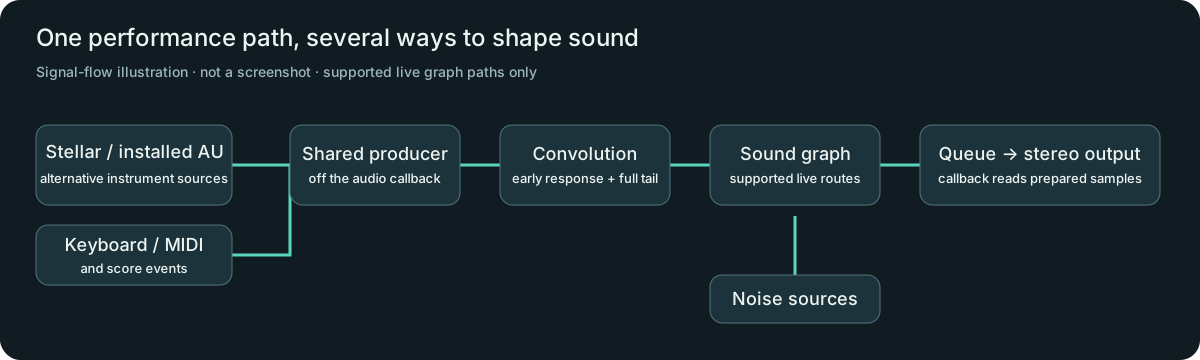
The main Soundscapes workspace offers Play, Shape and Inspect views around the same recipe and instrument. That gives the project a clearer centre than a collection of unrelated research panels: choose a source, hear how it behaves, then reveal the exact controls when needed. Sources can join through Mix stages, while shaping and space processors follow the signal. Some operators have a continuous live path; others use prepared rendering or finite previews. That distinction matters when presenting the app as a playable instrument.
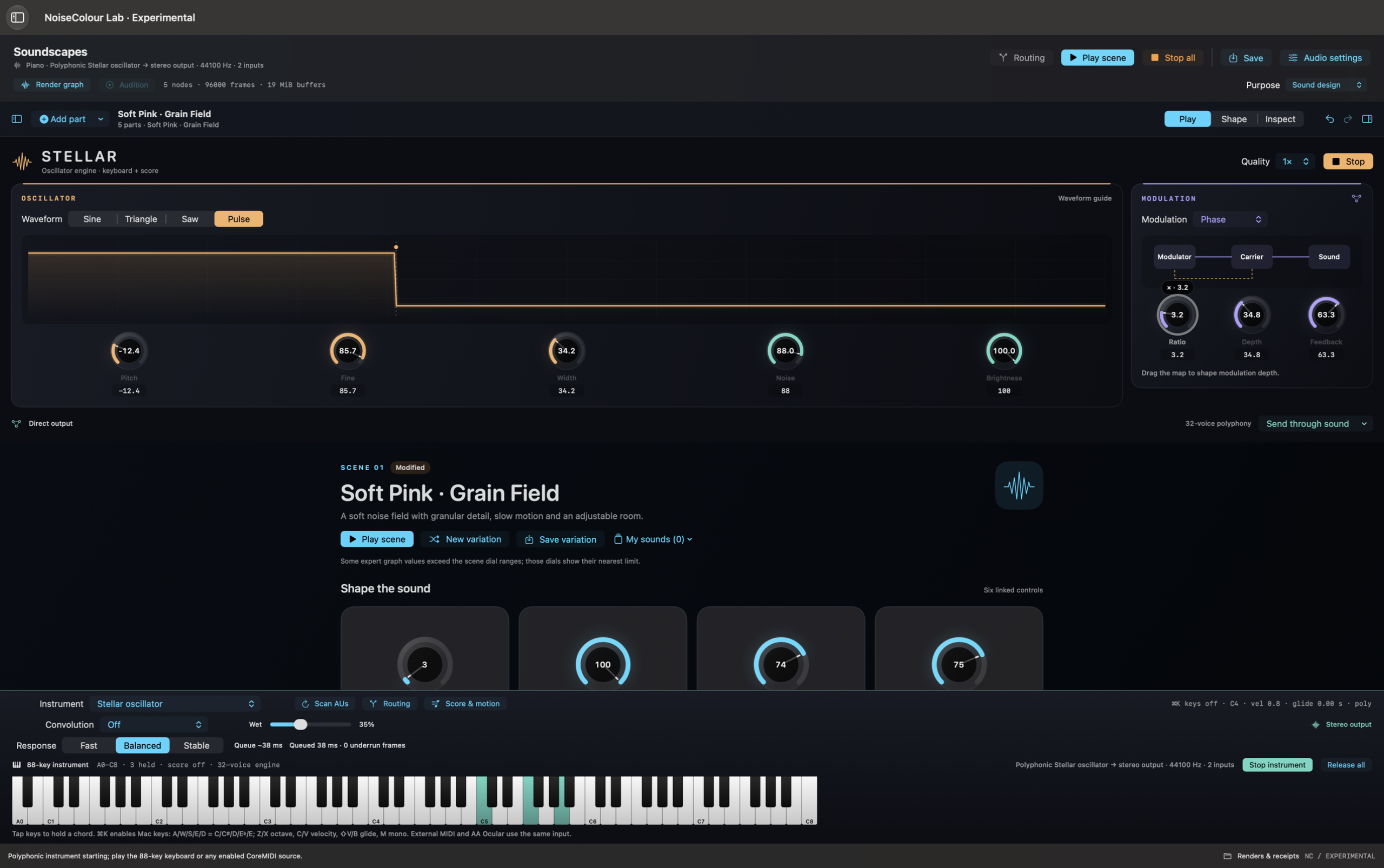
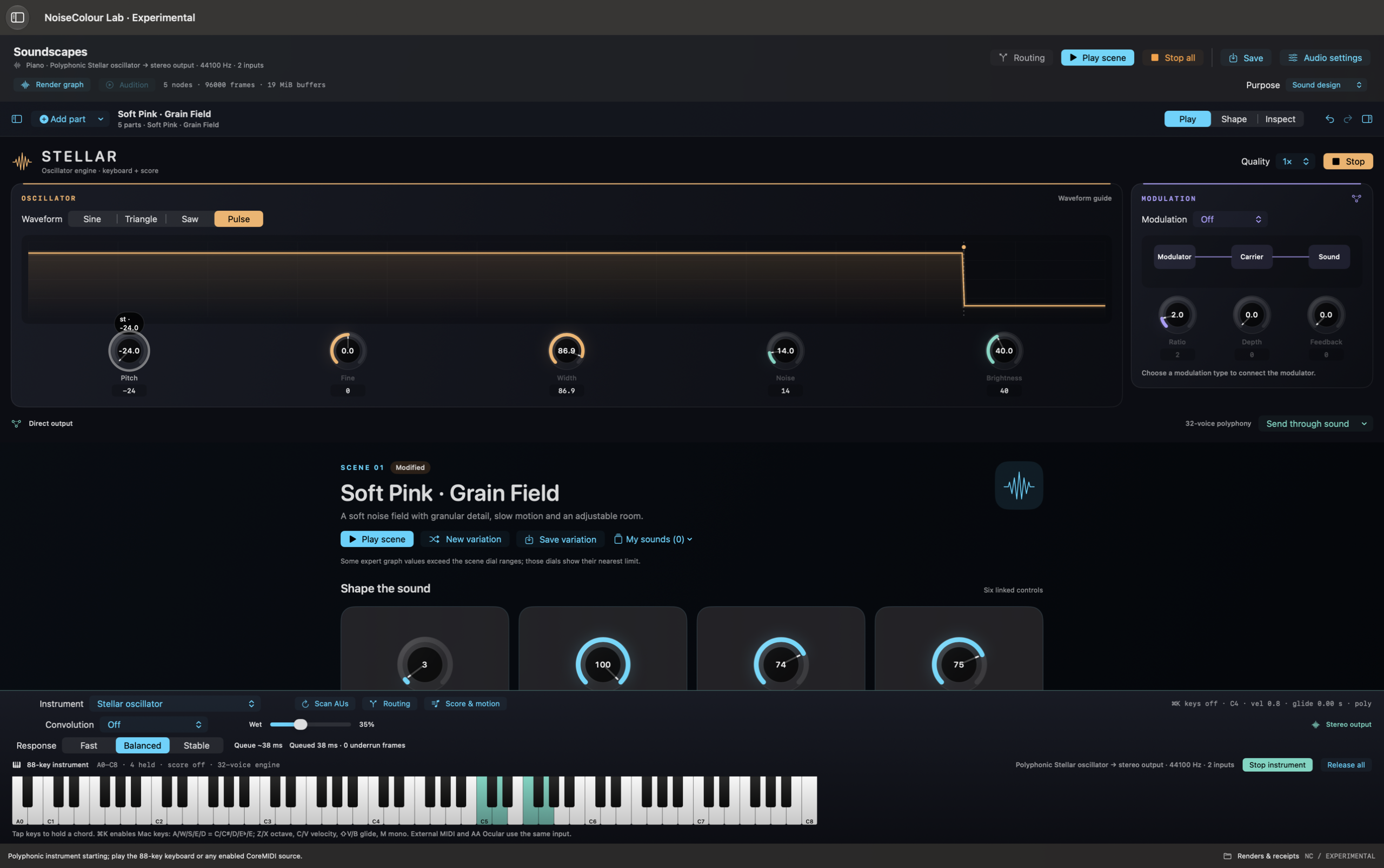
Stellar brings a visible oscillator editor into this workspace. Sine, triangle, saw and pulse waveforms sit alongside tuning, pulse width and selectable 1×, 2× or 4× quality. Frequency, phase and amplitude modulation connect a modulator and carrier, with explicit feedback behaviour. The keyboard, MIDI input, score and existing sound routing remain the performance surface. The visual waveform is a parameter guide rather than a measured spectrum.
External AU instruments are another source option. The installed OP-Xa V has been tested through the shared background producer, convolution and graph routing. Notes, score playback, pitch bend and pressure follow the existing input path. This integration does not turn Stellar-specific oscillator controls into undocumented controls for a third-party plugin. OP-Xa V is a tested example of hosting, not an included instrument or an endorsement.
Convolution now combines an immediate early response with the selected impulse's full tail, without adding an extra wet block buffer. The wet blend stays in the existing keyboard controls. Recent work reduced the steady render-ahead queue and added a temporary reserve around structural routing changes. A producer-specific Swift task executor supplies a separate interactive scheduling path while the audio callback remains a ring-buffer reader. A failed earlier candidate was retained rather than reported as a success.
The accepted 17 October build records 139 passing release tests. Its six sustained device trials covered OP-Xa V and Stellar at 1× and 4×, with Fast and Balanced response settings. Across 469 seconds of playback, 450 tracked events and 24 deliberate UI stalls, the final trials recorded zero device underruns, AU render failures or mailbox overflows. Application-event-to-callback p95 latency fell from about 67–69 ms to about 42–45 ms on the same MacBook Pro speakers at 44.1 kHz and 512-frame callbacks. These are bounded application-pipeline measurements, not physical key-to-speaker latency or a guarantee for every machine and patch.
Beyond performance, the lab offers imported audio, grains, voice/carrier processing, digital analysis, deterministic recipes and research models. The practical next steps are a retained end-to-end save/reopen/export session, portable assets, broader undo coverage and a small collection of verified patches. Some physical and advanced-noise experiments remain finite previews, and the presence of a panel does not establish scientific, acoustic or clinical validation. The current package targets macOS 26. The website now includes two real native Stellar screenshots and a 22.6-second silent interface video captured on 18 October 2026. A separate two-second generated noise reference demonstrates a rendered noise source. The video has no audio; an AU-specific walkthrough remains to be captured.
What stands out
- A common visual workspace connects sound creation, performance and inspection.
- Native oscillator editing and modulation make synthesis directly explorable.
- Shared AU and built-in performance paths retain noise routing and convolution.
- Measured latency work includes retained failures and bounded acceptance results.
- Deterministic recipes, analysis and receipts make experiments explainable.
Current limits
- Experimental local macOS app; current Package.swift targets macOS 26 and Swift tools 6.2.
- No verified public download, store listing, pricing or public source-license URL is supplied.
- Hardware acceptance is 44.1 kHz; 48/96 kHz OP-Xa V checks are offline.
- Latency excludes physical key delivery, plugin response and acoustic output; prepared fallback and route transitions can be slower.
- Only installed OP-Xa V is validated as the external AU example; the plugin is not bundled.
- Portable projects, complete undo, curated sessions and retained save/reopen/export listening acceptance remain priorities.
- Not all research operators run continuously; scientific, clinical and calibrated SPL claims are not established.
Features & evidence
Soundscapes workspace
installed-testedMove between Play, Shape and Inspect around a shared recipe and keyboard.
Recorded evidence
17 Oct native workspace/inline-editor observations; current README inspected 18 Oct.
Stellar oscillator
installed-testedSelect waveforms, tune pitch and pulse width, and use 1×/2×/4× quality in the main workspace.
Recorded evidence
17 Oct native UI observations and 1×/4× sustained device trials; 2× is a source-supported mode, not part of that device matrix.
Modulation network
component-testedExplore frequency, phase and amplitude modulation with explicit one-sample feedback.
Recorded evidence
Stellar source and 139-test build; 17 Oct playback exercised PM/FM/AM and width changes.
Noise and graph routing
installed-testedCombine instrument input with noise/Mix/Monster processing through supported continuous graph paths.
Recorded evidence
17 Oct final device trials each exercised two protected routing transitions. Unsupported graphs retain prepared fallback.
Convolution
installed-testedBlend an imported impulse with immediate early response and full tail, without added wet-block buffering.
Recorded evidence
17 Oct direct-oracle/core checks and actual-device trials; intrinsic IR onset remains.
External AU instruments
installed-testedUse a compatible installed instrument as the keyboard/score source; OP-Xa V is the tested example.
Recorded evidence
17 Oct actual OP-Xa V at 44.1 kHz; offline 48/96 kHz. This does not certify every AU.
Score and performance
installed-testedPlay looped score notes, automate supported controls and receive keyboard/MIDI events.
Recorded evidence
17 Oct sustained trials and external-event ordering/score tests; physical MIDI timing is not measured.
Voice and Carrier
sourceShape a carrier with imported audio using Monster Filter and a filterbank vocoder.
Recorded evidence
Current integration contract and source inspected; no new listening acceptance in this handoff.
Analysis and reproducibility
component-testedInspect digital descriptors, compare frozen renders, retain recipes and render receipts.
Recorded evidence
Archived acceptance recipe/receipt plus current source; broad research-domain validation remains open.
Experimental models
sourceExplore grains, stochastic dynamics, physical models and semantic/control prototypes.
Recorded evidence
Implementation ledger distinguishes working references, adaptations, surrogates and research gaps. Some previews are finite.
Review updates & corrections
- This packet separates NC Lab Experimental from the broader NoiseColour family.
- Carries the 17 October accepted inline Stellar/AU/convolution/latency work into the site intake.
- Current package floor is macOS 26; executor availability guards are not deployment requirements.
- No textual diff against the other agent’s 17 October family biography is asserted.
- 18 October 2026: real media handoff integrated into this page; captions distinguish native captures, edited comparisons and working web demonstrations.
Workflow walkthrough
A guide to the native workflow. These steps describe the app; only the recordings and images embedded on this page are available as website demonstrations.
- Open Soundscapes and choose Stellar through the existing instrument selector.
- Select Pulse, drag its width guide and compare exact values in the editor.
- Choose a modulation mode and adjust depth; use the existing keyboard or score to hear changes.
- Route the instrument through a Mix with coloured noise and a Monster Filter.
- Select an impulse and compare dry/partial/full wet; show queue and underrun diagnostics.
- Return to Inspect to explain the recipe and evidence. Describe export only for the documented supported built-in route; do not imply live AU/convolution capture is complete.
Planned captures · not yet available
- Optional browser illustration of β or pulse width, labelled as an educational web model.