Inside the project
Prepared with the project’s development agent from source and retained evidence. This is a project-owner assessment, not an independent customer review. Dated checks were not rerun for this website.
ResearchControls is the project owner's SwiftUI toolkit for building precise, inspectable research and professional interfaces, and it is the most mature of the interaction-foundations family. Its strongest, best-proven parts are the ones built pure-core-first: the canonical 4D pad (SemanticPad4D), the app-neutral semantic-export pipeline, and the document-backed Timeline Studio block editor, all exercised by a large unit-test suite (~459 tests at the 2026-10-03 receipts: 456 package + 3 AU bridge, debug + release builds green). Day-to-day it is useful as a drop-in control layer: a developer embeds a control bound to a value and gets numeric entry, accessibility, telemetry and semantic routing for free, while the host decides what each gesture means. The honest treatment of missing data (NaN/no-data stays no-data rather than a fake zero) and the explicit non-clinical framing make it suitable for scientific, medical-imaging and pro-audio tooling. The main caveats are about acceptance, not code: physical-device, VoiceOver, realtime-audio/DAW and macOS cursor-capture behaviour are not verified; the DICOM/NeuroAtlas host panels are bound but not yet placed in the app's view bodies; and there is no evidence of a public release, license or CI run. This is an owner review, not an independent endorsement; no ratings or user feedback are asserted.
What stands out
- Canonical-value discipline: SemanticPad4D keeps one X/Y/Z/W vector behind six projection planes; switching planes never resets hidden axes (enforced by AGENTS.md contract).
- App-neutral semantic export (descriptor/control ID, raw+normalized value, weight, tags, confidence, stability, provenance) so the package never couples to a host runtime or SemanticControlCore.
- Pure-core-first architecture makes behaviour testable without UI hardware; ~459 tests pass with debug+release builds (2026-10-03).
- Breadth: ~16-control family + a feature-complete read-only Research Visuals layer + a deep Timeline Studio block editor, all in one dependency-light package.
- Candid engineering: missing-data policy, parameter/unit contracts, and clearly documented package-vs-host acceptance boundaries.
Current limits
- No physical-device / VoiceOver / realtime-audio / DAW / macOS cursor-capture acceptance — package tests explicitly do not establish these (RELEASE_READINESS.md).
- Host DICOM/NeuroAtlas panels are type-correct and bound but not inserted into app view bodies and not link-verified against a full AssistantApp build (CONTROLS_ROADMAP handoff).
- No evidence of a public release, tag, package-registry entry, license decision or hosted CI run.
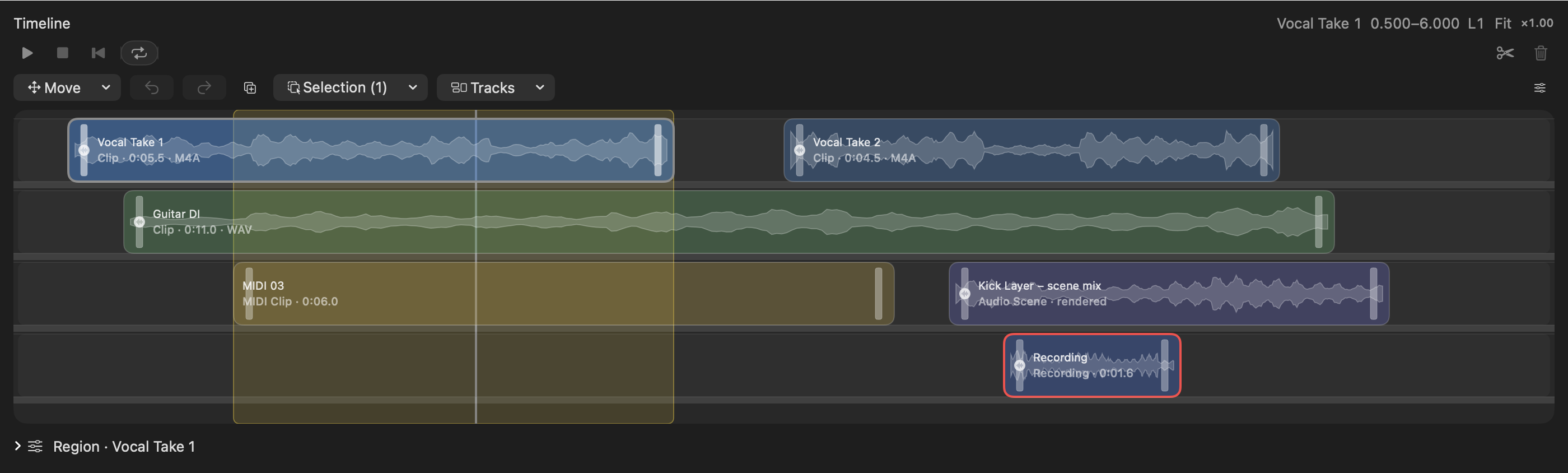
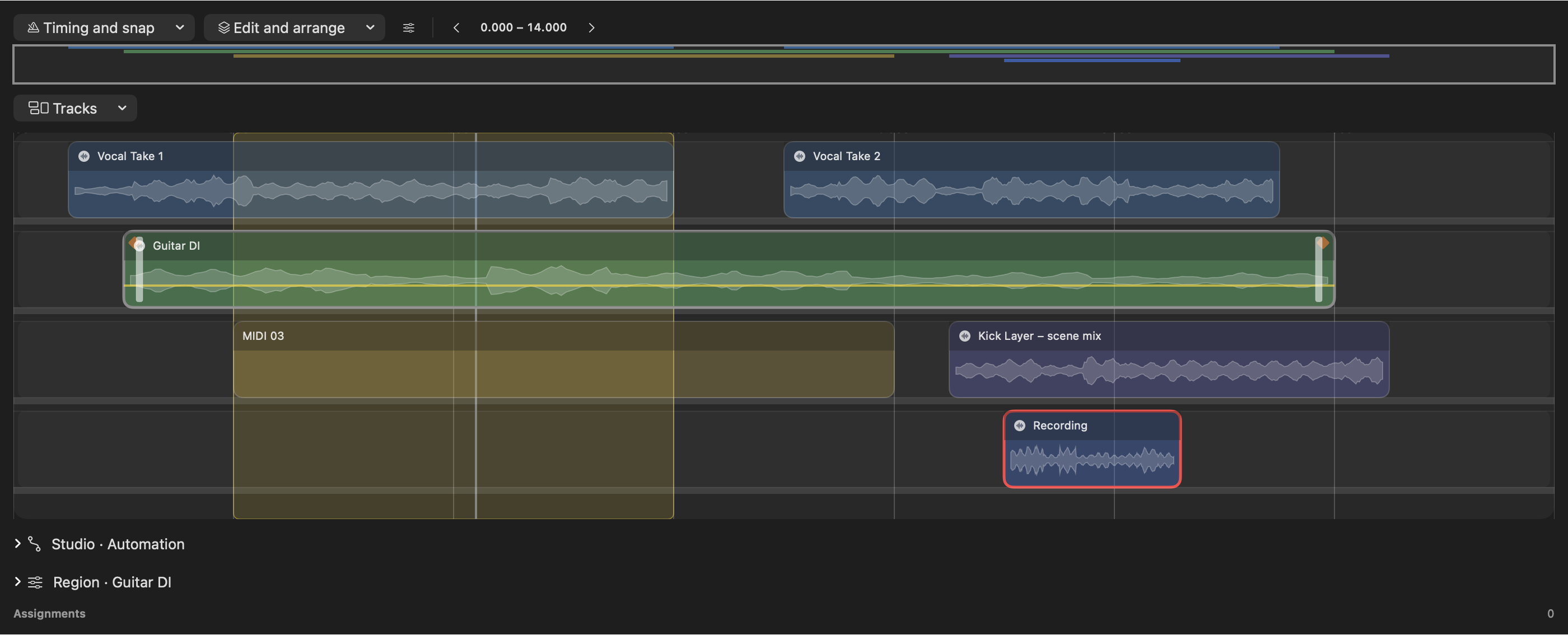
- Captured media exists only for the Timeline Block Editor; the flagship SemanticPad4D, rotary/fader/jog controls, Medical family and Research Visuals have no screenshots/video/audio.
Features & evidence
SemanticPad4D (4D pad)
source / component-testedUser drags a familiar 2D surface that drives a single canonical 4D value, switches among six projection planes, types exact per-axis values, and snaps to named 4D poses.
Recorded evidence
Projection, clamp, normalization, pose-snap and region unit tests within the ~459-test suite; debug+release builds (RELEASE_READINESS.md, 2026-10-03). No physical-device capture.
Semantic routing & export
source / component-testedUser enables/names/weights routes in the assignment matrix editor; the inspector shows resolved assignments and the host bridge converts them to runtime states.
Recorded evidence
Resolver/validator/bridge unit tests; Codable round-trip tests. Part of the 2026-10-03 suite.
Research control family
source / component-testedResearchKnob/Fader, ResearchJogWheel, ResearchStepper, ResearchSelector/EnumSelector, WindowLevelControl (HU WW/WL), ColormapEditor, EnvelopeEditor (4-point ADSR), DistributionSlider, ParallelCoordinatesEditor, RoutingGraphCanvas, SemanticPad3D, Pose6DControl.
Recorded evidence
CONTROLS_ROADMAP.md records 16 controls verified in-package; each source carries an '// Applies to' host note. Covered by reducer/model tests.
Research Visuals (read-only)
sourceLevel meters (VU/PPM ballistics + peak-hold), scrolling waterfall/spectrogram through any colormap, log-freq spectrum, goniometer/vectorscope, interactive RBJ-biquad EQ curve, transfer-function dial faces, observation panel.
Recorded evidence
RESEARCH_VISUALS.md marks the area 'feature-complete'; offscreen parity fixtures cover waterfall stop ties/missing-data/orientation. GPU fast-paths (goniometer/waterfall) not host-verified.
Timeline Studio block editor
source / component-tested / installed-tested (partial)User edits tracks/folders, fades/gain/crossfades, multi-point automation, takes/comps, groove grids to 1/128 with swing, and composes it inside a host layout (ruler/headers/inspector).
Recorded evidence
2026-10-03 host-composition pass: 456 package + 3 AU tests, release build, signed demo app ([local evidence archive]), native accessibility-tree probes confirmed menus/tools and a basic region move; 6 offscreen render PNGs captured. No realtime-audio/physical-gesture acceptance.
AUParameter bridge
component-testedOptional ResearchControlsAUBridge translates UI events into AUParameter touch/value/release and handles external feedback/preset refresh; audio engine stays in the host.
Recorded evidence
3 AU bridge tests; Examples/PackageConsumer harness exercised via keyboard/accessibility actions (no audio engine).
macOS cursor capture
sourceOn macOS the pad can lock the cursor for high-resolution relative input; Escape / Fn-double-click / app deactivation release it.
Recorded evidence
Implemented in Platform/macOS; RELEASE_READINESS.md states cursor-capture still requires manual host QA with real devices — not verified.
Review updates & corrections
- No builds/tests were re-run today (read-only), so verification figures remain the 2026-10-03 receipts (~459 tests, debug+release green) cited in the 17 Oct biography.
- Several core/test files show on-disk edits since 2026-10-17 (e.g. RoutingGraphRouting, WindowLevelControl + WindowLevelTests, EnumSelector, ColormapModel/ColormapEditor, MeterModel/ResearchMeter, ResearchStepper, SemanticPad3D, DistributionModel/Slider + tests, Pose6DModel/Control, JogWheelModel/ResearchJogWheel, LevelometerModel/ResearchLevelometer, ResponseFaceModel, SpectrogramModel, EQResponseModel/Curve + tests, ResearchWaterfallMetal). These look like routine refinements; architecture and public claims are unchanged, but current totals are unverified today.
- This session earlier applied a rendering fix to ResearchKnob/PalmaryKnob (ArcRingShape now measures from top via a -90° offset) so the coloured value arc aligns with the dial's pointer/detents — relevant to any future knob demo capture.
Workflow walkthrough
A guide to the native workflow. These steps describe the app; only the recordings and images embedded on this page are available as website demonstrations.
- Run the package demo (ResearchControlsDemoView) or embed SemanticPad4D in a view bound to a @State SemanticPad4DValue.
- Drag on the pad — the visible XY plane moves; switch the plane picker to .xz or .zw and note the hidden axes are preserved because there is one canonical vector.
- Type exact numbers into the all-axis numeric fields, then snap to a recommended 4D pose.
- Open the assignment matrix editor to enable/name/weight semantic routes; the inspector shows each resolved assignment with descriptor/control ID, raw+normalized value and confidence/stability.
- (macOS) enable cursor lock and tune sensitivity in the calibration panel; press Escape to release.
- Review recent edit events and the replay trace, then export the trace as JSON.
Planned captures · not yet available
- No video capture of SemanticPad4D, the control family or Research Visuals exists. A screen recording of the SemanticPad4D walkthrough above would need to be captured.
- No audio assets exist in the package.
Development biography · earlier archive
Development profile compiled from project source and retained records in October 2026. Dates and test results describe those records; they do not imply a new build, live acceptance test or public release.
Biography
Most UI toolkits treat a control as a thin wrapper over a single number. Research and professional tools need more: a gesture that carries several linked meanings at once, a value that survives switching views, a record of every edit for replay, and an honest boundary between "a measurement exists" and "a widget happens to show zero." ResearchControls is built around those needs. It is a SwiftUI package — not an application — whose job is to be the trustworthy input and display layer that a research host can wire into its own runtime.
The centrepiece is SemanticPad4D. On screen it looks like a familiar XY pad, but underneath it owns exactly one canonical SemanticPad4DValue with X, Y, Z and W components. The visible pad is always a projection of that 4D value onto one of six planes (.xy, .xz, .xw, .yz, .yw, .zw); switching planes never resets the hidden axes because there is only ever one vector. That discipline — "the visible control is a view of a canonical value" — is the package's core idea, and the project's operating contract treats it as non-negotiable: plane pickers, numeric fields, pose snapping, regions, calibration, replay and semantic export must all keep the same vector as source of truth, rather than degenerating into "an XY pad plus two unrelated sliders."
From that seed the package grew into a full control family. The catalogue in README.md lists discrete selectors (ResearchSelector/EnumSelector), scalar rotaries and faders (ResearchKnob, ResearchFader), a unit-aware ResearchStepper, an endless ResearchJogWheel, a DICOM-style WindowLevelControl (window width/level in Hounsfield units with CT presets), a 3-axis SemanticPad3D, a 6-DoF Pose6DControl, a ColormapEditor, read-only ResearchMeter/ResearchScope, a DistributionSlider (value plus uncertainty band), a four-point ADSR EnvelopeEditor, a RoutingGraphCanvas patchbay, and a ParallelCoordinatesEditor. A separate Medical/ family adds cross-section, crosshair-link, slab/band, volume-ROI, transfer-function, 3D-gizmo, cine-timeline and evidence-graph controls. A document-backed Timeline Studio block editor rounds it out, with tracks, folders, fades, automation, takes/comps, groove grids down to 1/128 and tempo/meter maps.
The design method is consistent and visible in the source: a pure, Sendable/Codable value model and a pure reducer with unit tests come first, and the SwiftUI view second. Every interactive control emits app-neutral semantic routes that resolve into assignments carrying descriptor ID, control ID, value kind, raw and normalized value, weight, tags, confidence, stability and provenance. The package never decides what a route means — a host app maps it into its own state. This is why AGENTS.md forbids ResearchControls from importing SemanticControlCore or any host runtime: the semantic runtime, registries and value-kind validation live in the host or a bridge package, and the controls stay reusable.
Two more themes run throughout. First, honesty about missing data: clamp helpers map NaN to a bound but that "does not establish that a measurement exists"; colormaps treat nonfinite positions as transparent no-data; waterfalls treat NaN/∞/empty rows as missing; meters keep a complete snapshot rather than repeating the last value when a sample is absent. Second, non-clinical framing: the package can support brain-model navigation, ocular tuning and adaptive displays, but it is explicitly "not a clinical inference system," and neuro-adjacent uses are described as research navigation, calibration or model exploration.
A concrete user journey: a developer adds the package by local path, drops a SemanticPad4D into a view bound to a @State value, and gets a plane picker, all-axis numeric fields, pose snapping and an assignment inspector for free. On macOS they can opt into cursor lock for high-resolution relative input (pointer deltas drive the plane; scroll and magnify drive latent Z/W; Escape or app-deactivation releases capture), tune it live with the SemanticPad4DCalibrationPanel, and record a SemanticPad4DTrace of every edit for JSON replay. A sibling "Research Visuals" area supplies the read-only chrome — level meters with VU/PPM ballistics, scrolling spectrograms through any colormap, a vectorscope goniometer, an interactive RBJ-biquad EQ curve, and dial faces that draw a parameter's real transfer function — all driven by one TimelineView(.animation) clock, with optional opt-in Metal fast-paths for the goniometer and waterfall.
The intended audience is builders of research, scientific, medical-imaging and pro-audio tooling who want controls that are precise, testable, accessible, and app-neutral at the semantic boundary — and who need the toolkit to be candid about where package verification ends and physical-device/host acceptance begins.
Main modules / what a visitor can see or try
Authored functionality (in-package):
- SemanticPad4D + sidecars: plane picker, all-axis numeric entry, pose snap, assignment inspector/matrix editor, region editor, calibration panel, Codable replay traces.
- Control family — each source file carries an
// Applies tonote mapping it to a host surface. - Research Visuals (
Sources/ResearchControls/Visuals/):ResearchWaterLevel,ResearchLevelometer,ResearchWaterfall,ResearchSpectrum,ResearchGoniometer,ResearchEQCurve,ResearchResponseFace,ResearchObservationPanel, halo/pacer/glow rings, band meter, sparkline, gauge ring . - Timeline Studio block editor +
TimelineStudioDemoView()and theResearchControlsBlockEditorDemoexecutable. - Runnable demos (code, not media):
ResearchControlsDemoView(package harness),TimelineStudioDemoView,Examples/PackageConsumer(swift run --package-path Examples/PackageConsumer RCConsumer— a local AUParameterTree, no audio engine).
Dependencies: none external; Metal/AVKit used only behind #if canImport(...) and are system frameworks. ResearchControlsAUBridge depends only on the core target.
Technical foundations
- Pure-core-first architecture (Sendable/Codable model + pure reducer + unit tests, then SwiftUI). Structured
ControlEditEventtelemetry; app-neutral semantic export triple (route → resolved assignment → host bridge). - SwiftUI
Canvas+ singleTimelineView(.animation)clock for visuals; CoreGraphics raster for the CPU waterfall; opt-in runtime-compiled Metal shaders (no.metalasset) for goniometer/waterfall fast-paths. - Validated parameter contracts, engineering unit tokens, EQ sample-rate handling (RBJ biquads below Nyquist), DICOM LINEAR window ramp, finite-value/missing-data policy — documented in
PARAMETER_CONTRACT.md,SCIENTIFIC_SEMANTICS.md,NUMERIC_AUDIT.md. - Important local packages/paths: this package (the project archive); host
AssistantAppDICOM/NeuroAtlas; bridge filesSources/Creative/NeuroAtlas/ResearchControlsSelectorBridge.swiftandResearchControlsWorkstationBridge.swift(additive — they do not modify existing views).
Current maturity by evidence
- Source implemented: Full control family + Research Visuals + Timeline Studio present (187 Swift sources under
Sources/). Research Visuals is marked "feature-complete" . - Tests passed: Latest owned pass (2026-10-03, block-editor host composition, matches HEAD
6fcb52d): 459 tests (456 package + 3 AU bridge). Other dated passes inRELEASE_READINESS.md: 453 (meter closure, baselineb47aab3), 442, 438, 434. Debug + release builds passed; DocC built with warnings-as-errors; both generic iOS targets built;Examples/PackageConsumerexercised via keyboard/accessibility actions. - Built:
swift buildandswift build -c releasepassed in the recorded runs (release build ~239 s / ~92 s debug, per the 2026-10-03 receipts). - Runtime/installed verified: Partial. A signed demo app was rebuilt (
/tmp/RC-Completion-Demo.app); native accessibility-tree probes confirmed menus/tools and a basic region move transaction. Not verified: physical Force-Touch/touchscreen/VoiceOver acceptance, continuous drag smoothness, realtime audio/DAW, macOS cursor-capture on real devices, hosted CI, and host-build placement of the bound DICOM/NeuroAtlas panels. - Released/deployed: No evidence of a public release, tag, or published package registry entry. Treat as an actively developed local/private package. Phase status : P0–P1 complete; P2 package-complete (host hardware QA pending); P3 package bridge complete (host integration pending); P4 package-complete first slice.
- Unknown: license/distribution decision; any public URL.
Roadmap (aspirational, from docs)
- Place the bound DICOM/NeuroAtlas panels into host view bodies and link-verify the two bridge files against a full AssistantApp build .
- Physical-device QA: macOS cursor capture (mouse/trackpad/Magic Trackpad, Escape/Fn/deactivation release, multi-display), Force-Touch/touchscreen/VoiceOver, realtime audio/DAW.
- Wire remaining RoutingGraph homes (DICOM
rcApplyfan-in, MISO→MESA→MEGA evidence graph); live GPU tuning for the Metal fast-paths; hosted CI on min/current Xcode. - Package-wide scientific/engineering/audio release gates in
PACKAGE_ROADMAP.md.
FAQs
- What is SemanticPad4D? A pad that looks 2D but keeps one canonical 4D value; the visible surface is a projection onto one of six planes, so hidden axes never reset.
- Does it do medical diagnosis? No. It is explicitly not a clinical inference system; neuro/ocular uses are framed as research navigation, calibration and visualization.
- How does it connect to an app? Through app-neutral semantic routes (descriptor/control ID, raw+normalized value, weight, tags, confidence, stability, provenance); the host maps them to its runtime. It never imports the host runtime or SemanticControlCore.
- Platforms/requirements? macOS 26 and iOS 26, Swift tools 6.2, SwiftUI. iOS gets everything except macOS cursor capture.
- Is it released? It builds and passes ~459 tests locally (2026-10-03), but there is no evidence of a public release, license decision, or device-acceptance sign-off.