Inside the project
Prepared with the project’s development agent from source and retained evidence. This is a project-owner assessment, not an independent customer review. Dated checks were not rerun for this website.
Sonics brings three related workflows into one macOS sound workstation: Hum Masker for a shaped noise bed, Mau Mau for room-sound analysis and selective replay, and Focus for rhythm added to sound in timed sessions. It uses AssistantApp’s shared audio and NoiseColour components, with live-take and offline-render paths connecting the work to the wider audio workspace.
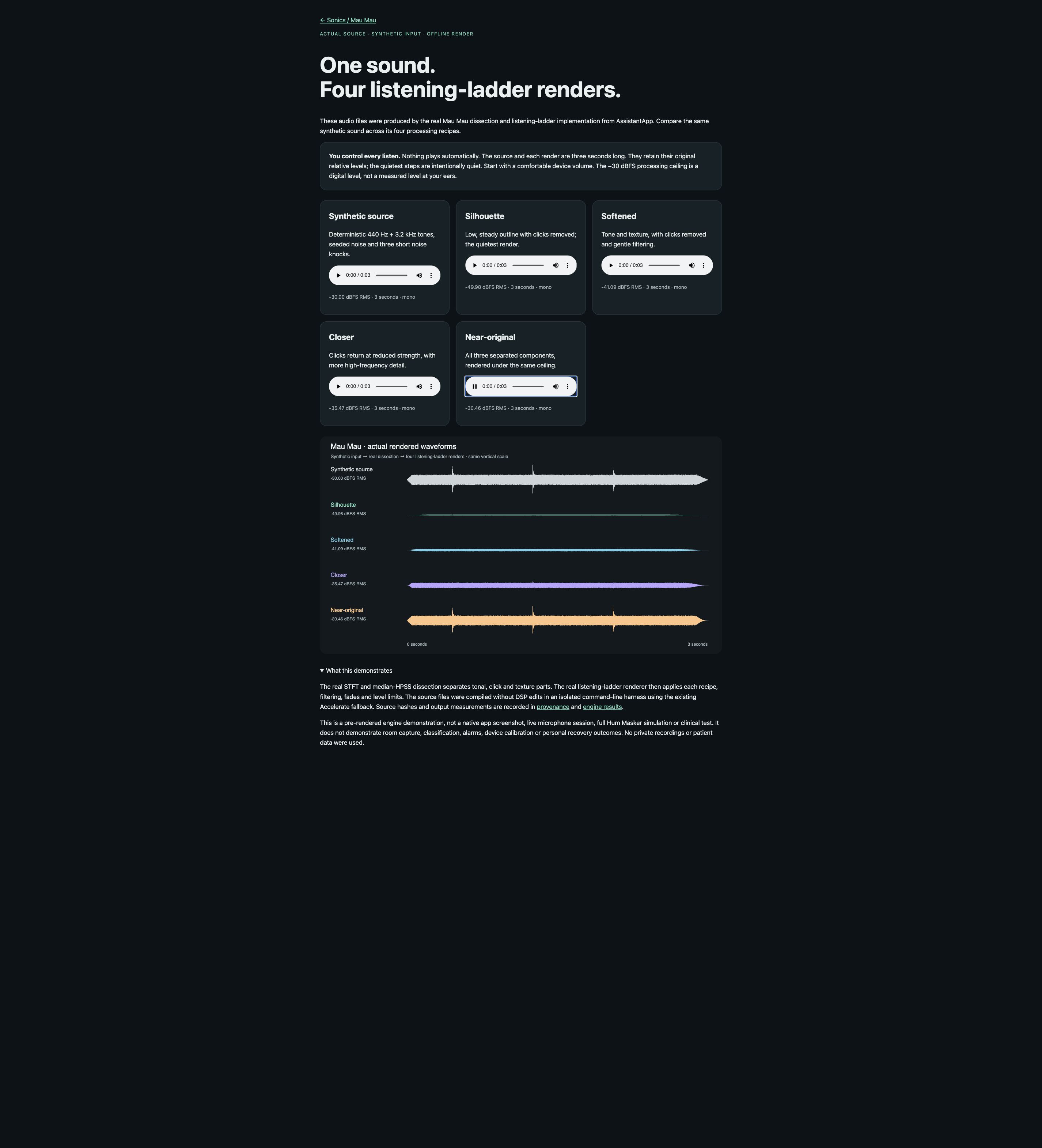
Mau Mau keeps short whole sound events, labels them with on-device sound classification, and can separate a captured event into tonal, click and texture components. Its listener-controlled ladder offers Silhouette, Softened, Closer and Near-original versions. Each step is chosen explicitly, with a countdown, stop control and a 0–10 response log; suggestions do not advance the ladder automatically.
An optional Cover it now mode shapes the masker around an intrusive sound. The source includes bounds on the adjustment, gradual transitions, alarm-related suppression and voice rules. Requested settings, applied state, playback plans and analysis reports are represented separately, so the runtime can explain what it actually decided. Optional calibration profiles use confidence checks and a flat fallback when a profile is unsuitable.
This is a research prototype for sound exploration and voluntary support. Component tests and historical build records support engineering claims, but this review does not establish a fresh installed-app or listening acceptance, a clinical benefit, or a sound-pressure level at the listener. Ambient capture may retain local sound recordings, including speech; retention enforcement and consent controls remain explicit review items.
What stands out
- Mau Mau's replay behaviour was rebuilt so it keeps whole sounds with the attack faded in, ranks them calmest-first and spaces them out — the earlier version replayed attack-first slices on a grid and sounded mechanical (maumau-sound 25/25, 21 Sep 2026)
- Safety rules are enforced in the policy, not just the wording: an alarm drops every band of cover on the next step, a tonal 1–5 kHz sound is not covered until the classifier has named it as something other than an alarm, and voices stay uncovered by default (maumau-cover 36/36, 21 Sep 2026)
- The cover cannot run away on speakers: it adds half a decibel per decibel of excess, a loop gain below one, proven against a 3 dB-per-dB control policy that does hold itself up
- Levels in the listening ladder come from a ceiling the listener sets (−45 to −15 dBFS, default −30), never from how loud the original was, and a step that keeps almost nothing of a sound plays as the near-silence it is instead of being turned up
- Each new capability is proved by an executable headless harness with negative controls before it reaches the app — four Mau Mau targets plus Focus, fit, bounce and appearance harnesses are in the repository
- The real-time cover EQ is bit-exact bypass at 0 dB and glides its gains, so an inactive feature changes nothing about the sound
- A blinded within-person A/B comparison exists for the Focus side with an exact paired sign-flip permutation test, the sample size fixed in advance and no interim looks
- On-device sound naming and local processing; short room-audio recordings may also be retained, including speech.
Current limits
- Nothing has been heard or seen by a person in a sitting: every claim here is a headless test or a compiled build (work map marks these NEEDS EARS / NEEDS EYES)
- No sound-pressure calibration on the Sonics side, so no statement can be made about what a listener actually hears in dB(A); the delivered-level monitor reports dBFS only
- Two halves of the personal-listening story live in different modules and share no state: the NoiseColour Soften lane has the headphone route gate but no alarm or speech rule, while Mau Mau has the alarm and voice rules but no headphone gate
- Microphone retention is specified but not enforced in the running app (the prune function is exercised only by tests), and the consent flag has no control in the interface — both must be closed before any study use
- Mau Mau writes short recordings of real room sound to disk locally, which can include speech; speech is used protectively and never transcribed there, but this needs saying plainly rather than being described as 'does not monitor speech'
- Graded listening is self-help framing with a clinician referral in the copy; it is structured exposure and has no efficacy evidence behind it
- macOS only (the module is guarded #if os(macOS)); no iOS session owner exists for the hum masker, and real-device audio acceptance is outstanding
- Next priorities, in order: give Soften the alarm and voice veto and Mau Mau the headphone gate; enforce retention and wire consent; add data export for the ratings log; then a first listening session with a person
Features & evidence
Hum Masker engine with NoiseColour-backed bed
component-testedPlays a shaped noise bed (colour, tilt, emphasis, room) that the rest of the module modulates.
Recorded evidence
sonics-spectrum 22/22 for the analysis (20 Sep 2026); app-built 21 Sep 2026 (r15); Combine wiring, preset applier and layout still NEEDS EARS/EYES
Mau Mau typed runtime (command → policy → applied state → report)
sourceTurning Mau Mau on is a typed command; what it is doing is published as applied state with a replayable semantic record.
Recorded evidence
13 XCTest suites in Tests/AssistantAppTests (MauMauSmokeTests, RuntimeContract, MicRingBuffer, PlaybackPlanner, PlaybackExecutor, Privacy, ProjectionPlan, Calibration x2, SampleEQ, RuntimeSupport, CaptureSplice, Fixtures); not re-run in this read-only pass; SonicsREADME doc status 85% (21 Jul 2026)
Whole-event capture and calm-first replay
component-testedKeeps a whole sound (0.35–4 s) with a 50 ms fade over its attack, measures it, and replays only calm ones, spaced out.
Recorded evidence
maumau-sound 25/25 (21 Sep 2026); app-built r17 11:09 21 Sep 2026; zero warnings in these files
On-device sound naming with alarm and voice protection
component-testedNames what it hears with Apple's SoundAnalysis classifier (303 labels mapped to 11 categories) and uses it to hold replays back and to refuse to cover alarms.
Recorded evidence
maumau-classify 23/23 — speech 0.99, beep 0.98, with silence, pink-noise, grazing-window and stream-gap controls (21 Sep 2026); app-built r18 14:51 21 Sep 2026
Tonal / clicks / texture split of a kept sound
component-testedSplits a captured sound into three parts using the stem splitter's own STFT and median HPSS, called read-only.
Recorded evidence
maumau-parts 54/54 — tone to tonal 100%, clicks to clicks 100%, white noise to texture 99%, parts recombine at −139 dB (21 Sep 2026); app-built r18
Graded listening ladder with 0–10 ratings log
component-testedFour steps built from those parts, a 3-second countdown, one-tap or Escape stop with a 40 ms fade, a rating after each listen, and suggestions that never move the ladder themselves.
Recorded evidence
rules verified inside maumau-parts 54/54 (levels against the ceiling, a 5 kHz beep's Silhouette at −92 dB not boosted, suggestions never advance, no treatment wording); app-built r18 14:51 and r19 15:10 21 Sep 2026; never used by a person
Cover it now — live cover policy and real-time 8-band EQ
component-testedWhen a sound intrudes, the masker leans toward it in up to three octave bands, at most 3/6/9 dB by the listener's choice, easing in about a second and out about three; off by default.
Recorded evidence
maumau-cover 36/36 — rumble covered in its bands only, alarm drops a running cover on the next step, knocks at 2 Hz ripple 0.01 dB vs 4.9 dB without the hold, loud-bed-on-speakers release vs a self-sustaining 3 dB/dB control, bit-exact bypass, +6.00 dB at 1 kHz (21 Sep 2026); app-built r20 21 Sep 2026, 355 symbols linked
Focus tab: rhythm added to sound, with a blinded A/B
component-testedBand-limited amplitude modulation and beats in guided sessions, with a within-person blinded comparison and a session journal.
Recorded evidence
npl-logic 219/219, npl-coord 114/114, npl-au 10/10, npl-dsp 47/47 (work map §5, 20 Sep 2026); app-built 23:21 20 Sep 2026; never run by a person
Sonics to the workstation: live take and offline bounce
component-testedRecords what Sonics is actually playing into the Voice Memos folder, or renders a session offline instead.
Recorded evidence
npl-live 36/36 and sonics-bounce 11/11 (20 Sep 2026); app-built 22:54 20 Sep 2026; the audio-thread taps and output duck are compiled but only their ring/pull halves are tested
Hardware calibration (mic linearisation, speaker pre-EQ), confidence-gated
sourceAn optional measured profile that flattens the microphone before analysis and pre-shapes playback; a missing, stale or low-confidence profile degrades to a visible flat fallback.
Recorded evidence
Sonics/Calibration/* with SonicsCalibrationRuntimeTests and SonicsCalibrationApplierTests present; no sound-pressure calibration anywhere on the Sonics side; AudioIOCalibrationIO is declared and never constructed (AUDIOIO_ADOPTION.md, AA side built 4 Oct 2026, device acceptance outstanding)
Review updates & corrections
- The 17 October AssistantApp biography named 'Hum Masker/Sonics' only in a one-line list under Hearing and health; this packet is the first module-level review of it.
- Correction to the 17 October portfolio table: in this checkout the module is at AssistantApp/Sonics/, not Sources/Creative/Sonics.
- Correction: the standalone Desktop app SonicReassurance (sound-in, light-out visualiser, no audio output) is a separate codebase. It shares only the 'MAUMAU' name with this module — the 17 October note treated the association as unconfirmed; they are confirmed distinct, with no shared source.
- Material capability added on 21 September 2026, after the previous audits: whole-event capture with calm-first replay, on-device sound naming with alarm and voice protection, the tonal/clicks/texture split, the graded-listening ladder with its ratings log, and 'Cover it now' with its real-time 8-band EQ. Builds r17 11:09, r18 14:51, r19 15:10 and r20 all reported BUILD SUCCEEDED on 21 September 2026 with no warnings in these files.
- Cross-module note dated 4 October 2026: the AudioIOKit adoption changed Sonics' audio core (SAudioIOCore deinit no longer stops the host synchronously off the main thread); real-device acceptance and an iOS session owner for the hum masker remain outstanding, and Sonics/Calibration/AudioIOCalibrationIO.swift is declared but never constructed.
- No ratings, user feedback, clinical result or acceptance exists for any part of this module; nothing has been listened to by a person in a sitting.
- 18 October source check: typed playback execution is wired in the active engine. Historical component results have not been rerun; local audio retention is disclosed explicitly. No new native screenshot or listening acceptance is supplied.
Workflow walkthrough
A guide to the native workflow. These steps describe the app; only the recordings and images embedded on this page are available as website demonstrations.
- Open AssistantApp on macOS and go to the Sonics window, then the Mau Mau tab (⌃3 in Sonics' own toolbar).
- Press Activate. Mau Mau starts listening through the microphone; the 'What Mau Mau hears' panel shows the voice probability and any sounds the on-device classifier has named in the last ten seconds, and says whether the voice figure came from the classifier or from the fallback estimate.
- Make a sound in the room — knock on the desk, run a tap, let a beep sound. After a pass or two the kept sound appears in the Graded listening list with its name, length and the split between tonal, click and texture parts.
- Set 'Loudest allowed' to −30 dBFS, pick the sound, and press 'Listen to Silhouette'. A three-second countdown runs, the step plays, and you rate it 0–10. Stop is one tap or Escape at any point.
- Press 'Step closer' to hear the Softened version, rate it, and watch the suggestion line — it only ever suggests; the ladder never advances itself.
- Optionally switch on 'Cover it now' and set 'At most' to 3 dB, then make a low rumble: the band meters lean toward it and ease back. Sound an alarm-like beep and the cover is released at once, with the panel saying why.
Planned captures · not yet available
- Mau Mau graded listening: choosing a kept sound, the countdown, one-tap stop, and a 0–10 rating
- 'What Mau Mau hears' and 'Cover it now' panels, showing a named sound, the per-band cover meters and the alarm-release notice
- The same captured sound at all four ladder steps, back to back, rendered at a −30 dBFS ceiling